
What Is a NetSuite Administrator and Why Your Business Needs One
NetSuite often becomes the central operating system of a company. It ties together finance, operations, supply chain, sales and reporting, which means the quality of the system affects almost every part of the business. While NetSuite delivers a powerful foundation, its effectiveness depends entirely on how well it is configured, governed and continuously improved. That responsibility sits with the NetSuite Administrator.
A skilled administrator does not simply “keep the lights on.” They shape how information flows, how processes run and how quickly leadership can make decisions. Their work influences operational speed, reporting accuracy, system reliability and long-term ERP return on investment. When the role is done well, NetSuite becomes a strategic asset. When it is done poorly or inconsistently, the system becomes a source of hidden cost, friction and risk.
This pillar article explains the business value created by strong NetSuite administration and shows why the role has such a measurable impact across operational, financial and strategic levels.
[ez-toc]
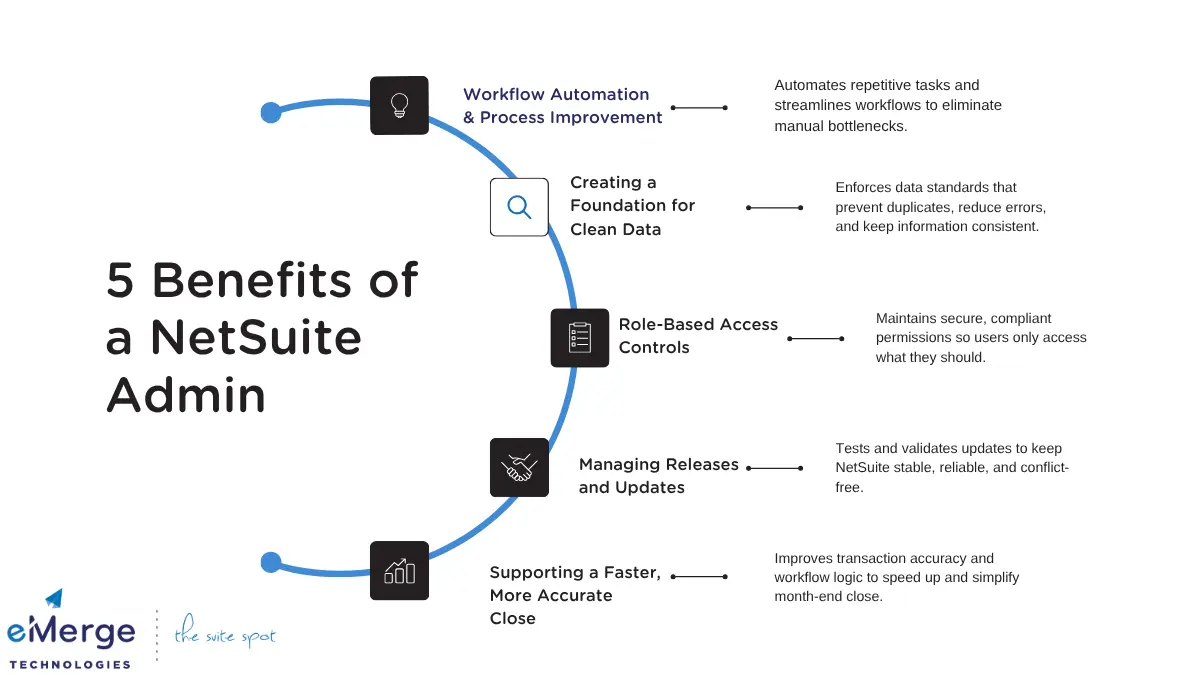
Successful companies treat NetSuite as more than an accounting tool. They treat it as a core operating platform. For that platform to remain stable and aligned with the business, it needs dedicated oversight. NetSuite does not maintain its own data hygiene, workflow logic or governance standards. Without ongoing care, issues accumulate. Reports slow down. Fields and forms drift from their original purpose. Integrations break quietly in the background. Each small issue erodes trust and slows teams down.
A NetSuite Administrator prevents this decline by continually aligning the system with how the business actually operates. They understand the relationship between processes and data. They document changes. They evaluate the impact of new requirements and help the system evolve safely. In short, they guard the integrity of the ERP. Their work creates the conditions for accurate reporting, reliable workflows and predictable operations.
Administrators also play a strategic role because they sit at the intersection of departments. They see how finance, operations, sales and service depend on the same data. That cross-functional visibility allows them to identify misalignments and recommend improvements that a single department might overlook. In many organizations, this cross-functional perspective becomes essential for business planning and transformation.
Why the NetSuite Administrator Role Gets Over Looked and The Rise of the Accidental Admin
Most organizations don’t intentionally under-resource NetSuite. What usually happens is far simpler: everyone assumes the hard part was “going live.” Once the implementation partner hands things off, the business expects the system to run itself.
It works for a while. Until it doesn’t.
The “Go-Live and Move On” Myth
After hundreds of client rescues, I can tell you the same pattern repeats: NetSuite goes live, the partner steps back, and internal teams assume configuration changes will be “occasional.”
But NetSuite is a living system. Every new hire, new product line, or new integration creates ripple effects that someone must manage. Without a dedicated strategist, the system drifts.
The Rise of the “Accidental Admin”
When the implementation partner leaves, the keys to the system are usually tossed to the “smartest person in the room.” Maybe it’s the Controller, an Ops Manager, or a tech-savvy Power User.
We call this the Accidental Admin Phenomenon.
You didn’t apply for this job: You were just the one who picked up the system faster than everyone else.
You are doing two jobs: You are expected to manage your actual role and field every “password reset” or “workflow error” request from the entire company.
It is normal to feel overwhelmed: If you feel like you are drowning in tickets rather than managing a strategy, it’s not your fault. It’s a resource issue.
These accidental admins are often brilliant, but they are forced into “firefighting mode” immediately. They don’t have time for Governance First, so they are forced to apply band-aids just to keep the business moving.
Real Pain Stories We See Weekly
When an Accidental Admin is unsupported and forced to prioritize speed over governance, the environment starts to degrade:
Users revert to spreadsheets: Because fixing the system takes too long, users export data to Excel to “just get it done.” The ERP ceases to be the source of truth.
Shadow IT takes over: Departments create their own naming conventions or custom fields, making cross-department reporting nearly impossible.
Permissions drift: To solve access issues quickly, roles are copied and pasted. Suddenly, half the company has access to financial data they shouldn’t see.
Silent failures: Integrations start filling the system with partial or inconsistent data, but nobody has the bandwidth to investigate the root cause.
Most leaders don’t realize anything is wrong until crucial business decisions are being made from reports that no longer tell the truth.
If you think the on-going health of your NetSuite environment has been impacted by poor NetSuite administration, you can get a Health Check from eMerge. Learn more Here!
How a NetSuite Administrator Improves Operational Efficiency
Operational efficiency is one of the most noticeable impacts of good NetSuite administration. When processes run smoothly, teams work faster and with fewer mistakes. When processes become fragmented, cycle times increase and workarounds multiply.
Workflow Automation and Process Improvement
A central part of the administrator’s role is identifying where automation can reduce workload or eliminate repetitive tasks. They use SuiteFlow and related tools to create structured, predictable workflows that replace manual steps. For example, instead of sending emails back and forth for approvals, a workflow can route tasks to the right individuals with specific conditions attached. This reduces confusion, speeds up approvals and removes variability.
Administrators also audit existing workflows. It is common for companies to accumulate scripts and rules that served a purpose years ago but no longer fit. These outdated processes slow down users, cause bottlenecks or trigger unnecessary exceptions. The administrator evaluates these workflows and either updates or retires them. This creates a leaner process environment where fewer things need manual intervention.
Reducing Manual Work in Finance and Operations
Many ERP processes evolve informally, often involving spreadsheets, hand-entered data or offline steps that create hidden delays. An administrator identifies these pain points by reviewing transaction histories, user behaviors and system logs. Once identified, they work to replace manual tasks with automated actions or cleaner configurations. This creates efficiency across order management, billing, purchasing, receiving and inventory management.
The benefit extends beyond speed. Reduced manual work lowers the chance of typing mistakes, incorrect selections, missing fields and double entries. It builds consistency into daily operations and frees teams to focus on higher-value work.
Improving Alignment Between Departments
Departments often customize their own processes without considering the broader system. These isolated changes eventually cause conflicting workflows, inconsistent data and reporting discrepancies. A capable administrator steps in to unify processes and enforce a shared operational structure.
This involves standardizing forms, fields, naming conventions and workflow logic. It also involves facilitating discussions between departments to clarify ownership and expectations. The result is smoother collaboration, fewer exceptions and stronger confidence in the system’s outputs.
Creating a Foundation for Clean Data
Clean data depends on clear structure. Administrators build and enforce standards for naming, validation and record creation. These standards prevent common sources of confusion, such as inconsistent customer names, duplicate vendors or mismatched item records. Administrators review data imports, maintain lookups and spot patterns that indicate flaws in the way records are created. They also identify fields that are no longer used and simplify forms so users enter the right information with fewer mistakes.
Strong governance makes data easier to work with and dramatically reduces the need for cleanup during financial close or audits. It also supports long-term scalability because information maintains consistent meaning as the company grows.
Supporting a Faster and More Accurate Close
The quality of the month-end close depends heavily on the structure and cleanliness of ERP data. Administrators influence close speed and accuracy by maintaining proper workflows, validation rules and accounting structures. They ensure transactions flow through the system correctly and that reports reflect the proper accounts, periods and classifications.
For example, if departments frequently post transactions to the wrong period or select the wrong subsidiary, administrators adjust forms, add validation logic or create reminders that guide users toward accurate entry. These changes reduce manual adjustments and create a smoother reconciliation process.
Maintaining Reliable Dashboards
Executives rely on dashboards that summarize performance in real time. Administrators ensure these dashboards pull from the correct fields, calculate metrics consistently and return results quickly. They refine filters, address slow searches and redesign saved searches that place unnecessary load on the system.
When dashboards remain accurate and responsive, leadership can identify trends earlier, evaluate performance faster and make decisions with confidence. This also reduces the time analysts spend repairing or recreating reports that should already be reliable.
For more information on how a NetSuite Admin improves dashboards check out this NetSuite Admin Reporting guide.
Role-Based Access Controls
Administrators design and monitor access permissions to ensure employees have the right level of visibility without overreaching into sensitive areas. This supports segregation of duties principles and helps prevent unintentional or improper actions. For example, the person who enters vendor bills should not be the same person who approves payments.
By reviewing permissions regularly and adjusting them when employees change positions, administrators maintain control over who can access critical functions. This reduces exposure and keeps the system aligned with internal policies.
Audit Trails and Compliance
Auditors require clear evidence of how transactions move through the system. Administrators preserve this evidence by maintaining clean approval chains, consistent documentation and accurate audit logs. They work with finance teams to ensure controls operate as intended and that the system reflects current compliance requirements.
In environments that must follow strict standards, such as SOX compliance, the administrator’s governance work becomes a direct contributor to audit success. A well-governed NetSuite environment reduces the cost and complexity of reviews and lowers the risk associated with user access or transaction history.
Change Management That Protects Stability
An ERP system evolves along with the business. New products, new workflows, reorganizations and market shifts all require system changes. Poorly managed changes can destabilize the ERP. Administrators prevent this by documenting requirements, testing adjustments in a sandbox and rolling out updates in controlled steps.
This type of structured change management protects system reliability. It also reduces the shock that occurs when users suddenly encounter new processes or forms without preparation. Over time, consistent change management preserves trust in the system and supports long-term evolution of the platform.
Improving Search and Script Performance
Saved searches and scripts accumulate as companies grow. Some become outdated, redundant or poorly designed. These can slow down the system or produce inconsistent results. Administrators review searches and scripts regularly, identify those that need refinement and remove those that no longer serve a purpose.
Optimized searches load faster. Refined scripts run more predictably. As a result, users experience fewer interruptions, and system performance remains strong even as data volume increases.
Managing Releases and Updates
NetSuite updates introduce new features but can also create conflicts with customizations. Administrators review release notes, test critical workflows in a sandbox and identify adjustments before updates reach production. This proactive approach reduces downtime and ensures the business benefits from new functionality without unexpected issues.
Check out our guide on NetSuite Release Management for more information.
Reducing System Disruptions
System reliability depends on vigilant monitoring. Administrators track error logs, integration behavior and high-volume transactions to catch problems early. When disruptions occur, they diagnose the cause, coordinate with affected teams and implement fixes that prevent recurrence. This approach builds confidence in NetSuite as a dependable platform that supports daily operations.
Multi-Entity and OneWorld Support
Growth often involves new subsidiaries, new currencies or international operations. Administrators configure OneWorld to support these expansion needs by structuring records, tax logic, consolidation rules and intercompany processes correctly. They help leadership plan for the impact of expansion on reporting and operational workflows.
Without this oversight, global operations risk fragmenting into separate, inconsistent data sets. With proper administration, the company gains a unified view of performance across all entities.
Managing Integrations With Other Systems
Most companies rely on a collection of tools beyond NetSuite. These include CRM systems, WMS platforms, eCommerce storefronts and FP&A solutions. Each system introduces dependencies that must remain stable. Administrators manage integration logic, monitor sync behavior and troubleshoot errors to ensure that information flows cleanly across the technology stack.
Stable integrations allow teams to rely on unified data. They reduce manual reconciliation, lower operational overhead and support a more modern and connected digital environment.
Enabling New Business Models
As companies introduce new offerings or shift their go-to-market strategy, NetSuite must adjust. Administrators redesign forms, workflows and reporting structures to reflect new revenue models, fulfillment paths or inventory strategies. These adjustments ensure the ERP remains aligned with how the company actually operates.
This work reduces the time it takes for new business units or product lines to become fully integrated into financial and operational processes. It also reduces the risk that changes in strategy create confusion or reporting gaps.
Risks Created by Poor NetSuite Administration
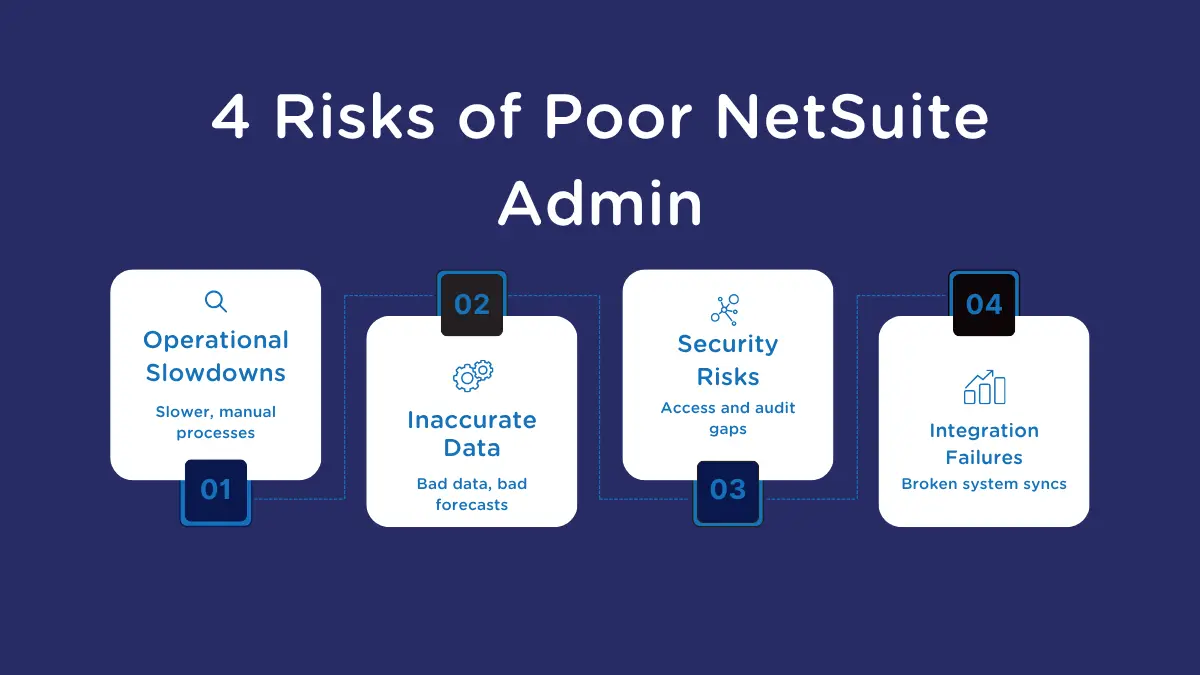
The absence of strong administration does not immediately break the system, but problems accumulate quietly. Eventually, they become visible in slow workflows, poor data and inconsistent reporting.
Operational Slowdowns
Processes built on outdated workflows or unclear rules force teams into manual workarounds. Approval cycles become longer. Users spend more time correcting errors or tracking missing information. These slowdowns reduce productivity and increase frustration.
Inaccurate Data and Poor Forecasting
Inaccurate data has a ripple effect. Inventory planning becomes more difficult. Sales forecasts lose reliability. Budget comparisons become harder to interpret. Finance teams spend more time reconciling discrepancies. Without clean data and consistent processes, leadership loses the ability to rely on system output.
Compliance and Security Exposure
Weak governance increases risk. Over-permissioned users may access data they should not see. Missing approval chains create audit issues. Inconsistent logs make it hard to trace actions. These vulnerabilities can lead to real financial, legal or reputational consequences
Integration Failures and Data Sync Issues
When integrations aren’t monitored or maintained, sync errors begin to pile up. Order data may not flow from eCommerce platforms, inventory counts may fall out of alignment, and CRM updates may never reach NetSuite. These hidden failures create conflicting data sets across systems and force teams into manual reconciliation that destroys efficiency.
eMerge Pro Tip: Beware the “Ticket-Closing” Trap
Don’t measure your Administrator’s success by an empty inbox. An admin who is 100% reactive—resetting passwords and fixing data errors manually—is actually building technical debt.
Real administration isn’t about closing tickets; it’s about preventing them.
A healthy Admin role should follow the 30/40/30 Rule:
30% Support: Handling daily issues.
40% Optimization: Improving workflows to stop those issues from recurring.
30% Roadmap: Planning for upgrades and new features.
If your Admin spends 90% of their week fighting fires, you don’t have an Administrator. You have a Help Desk.
For more information on the risks of poor admin support, check out our guide 9 Signs Your System Needs NetSuite Admin Help
Should a NetSuite Administrator Be a Dedicated Role?
Whether a NetSuite Administrator should be a dedicated position depends on how central NetSuite is to daily operations. Companies with heavy automation, multiple entities, integrations or frequent process changes gain the most value from a full-time admin who can maintain system health and support continuous improvement.
When a Dedicated Admin Makes Sense
A dedicated role is ideal when the business relies on NetSuite for core financial and operational workflows. The system needs steady attention, and quick responses prevent issues that slow teams down.
When Shared Administration Is Sufficient
Shared or part-time administration can work for smaller companies with simple processes, low transaction volume and mostly out-of-the-box configurations.
Roles That Should Not Overlap With Administration
Even in smaller organizations, certain roles should not absorb NetSuite administration. Finance managers, controllers, operations leaders and IT generalists already carry responsibilities that conflict with consistent ERP governance. When these roles take on admin duties, essential tasks such as data hygiene, workflow oversight and permissions management are deprioritized. This creates long-term risk and leads to system drift, inaccurate reporting and avoidable operational issues. You can learn more about this topic by checking out our in-depth article on Dedicated NetSuite Administrators.
Outsourcing Versus Insourcing Your NetSuite Administration
Many organizations reach a point where they must decide whether NetSuite administration belongs in-house or with an external partner. The right choice depends on the company’s size, growth plans, internal skill sets and the complexity of its NetSuite environment. Each model brings strengths that affect operational stability, system improvement and long-term ERP performance.
When In-House Administration Makes Sense
An internal administrator works well when the business needs someone closely connected to daily operations. In-house admins understand the specific workflows, team habits and unique requirements that shape how NetSuite should function. They can respond quickly to user questions, refine processes in real time and help maintain alignment across departments.
This model works best for companies with ongoing change, frequent new initiatives or a steady backlog of improvements. The limitation is bandwidth. A single internal admin may struggle to support a fast-growing or highly customized environment without additional help.
Check out this complete guide on Fractional NetSuite Administrators for more information on this topic
When Outsourced (Fractional) Administration Adds More Value
Outsourcing is useful when a company needs deeper expertise, broader coverage or support across specialized areas. External NetSuite administrators, also known as Fractional NetSuite Administrators, bring experience from many implementations and industries, which shortens troubleshooting time and improves solution design. This model is especially effective for smaller teams, companies with complex integrations or organizations that do not have enough work to justify a full-time role.
The trade-off is that external providers are not inside the daily workflow, so communication and structured engagement become essential to maintaining alignment.
If you are interested in a Fractional NetSuite Administrator to support your business, check out our Fractional NetSuite Admin Service!
Hiring a NetSuite Admin: Skills vs. Certifications
If you are writing a NetSuite Admin job description or browsing LinkedIn profiles, you will see two badges appear constantly. It is tempting to use these as your primary filter for candidates.
However, after fixing hundreds of environments managed by “certified” professionals, we know that a badge does not guarantee competence.
Here is how to decode the credentials and find a candidate who can actually stabilize your system.
Decoding the NetSuite Certifications
For those looking to break into the field or hiring managers evaluating resumes, these are the industry standards:
SuiteFoundation Certification: This is the entry-level baseline. It proves the candidate speaks the “vocabulary” of NetSuite (e.g., they know the difference between a Lead and a Prospect). It is essential, but it is purely academic.
NetSuite Certified Administrator: This is the technical standard. It tests the mechanics. Can they build a workflow? Can they map a CSV import? Passing this requires study and hands-on practice.
The “Happy Path” Problem
Why do certified Admins sometimes fail? Because the exam tests the “Happy Path.”
The exam asks: “How do you create a workflow to approve a Sales Order?”
The exam does not ask: “The Sales VP refuses to use the approval process because it’s too slow, and the CFO wants a different threshold for international subsidiaries. How do you negotiate this conflict without breaking the system?”
A certification proves a candidate knows how the tools work. It does not prove they have the business acumen to apply those tools to your specific, chaotic reality.
The “Battle-Tested” Interview Strategy
When hiring, treat the certification as a baseline, not a guarantee. You need an Admin who is battle-tested, not just book-smart.
Instead of generic technical questions, ask for “War Stories” to reveal their problem-solving ability:
Ask about failure: “Tell me about a deployment that broke something. How did you fix it, and how did you communicate it to the users?”
Ask about pushback: “How do you handle a department head who demands a customization that you know will cause technical debt?”
Ask about documentation: “If you left tomorrow, how would the next person know how your workflows operate?”
A candidate who can explain why they made a decision is always more valuable than one who just knows how to change a setting.
For more information on this topic, check our guide to Hiring a NetSuite Administrator.
Conclusion
A well-managed NetSuite environment supports efficient operations, reliable reporting and faster decision-making. The NetSuite Administrator plays a central role in shaping how effectively the system serves the business. Their work reinforces process discipline, protects data integrity, strengthens compliance and prepares the organization for future growth. As companies depend more on connected systems and real-time insights, the administrator’s contribution becomes even more essential.
