NetSuite Integration
The Complete Interactive Guide
Read the full guide below for more detail — this is your quick interactive companion.

The Users Guide to NetSuite Integration 2026: API, Tools, Costs, and Governance
NetSuite is the heart of your business, but it cannot survive as an island.
For modern companies, the true power of an ERP isn’t just in storing data—it’s in moving it. Whether you are a CFO trying to eliminate manual data entry, an Operations Director fighting shipping errors, or a Systems Architect designing a scalable stack, the quality of your integrations defines the efficiency of your business.
However, “building an integration” is deceptively simple. Many businesses rush into connecting apps, only to create a fragile web of “spaghetti code” that breaks during peak seasons, creates data silos, and frustrates staff.
This guide bridges the gap between Business Strategy and Technical Execution. We move beyond basic definitions to cover the architectural patterns, software tools, and governance strategies required to turn your NetSuite environment into a finely tuned engine of automation.
For more information on NetSuite, check out our Complete NetSuite Guide.
What is NetSuite Integration?
NetSuite Integration is the automated synchronization of data between Oracle NetSuite and external systems (such as Salesforce, Shopify, or banking portals) to establish a “Single Source of Truth.”
By connecting these systems, organizations eliminate manual data entry, reduce human error, and accelerate business processes like “Order-to-Cash” and “Procure-to-Pay.”
NetSuite API Integration: Choosing Your “Pipe”
When architects ask, “Does NetSuite have an API?”, the answer is yes—but it is not a single tool. The NetSuite API is actually a suite of four distinct protocols (or “pipes”) that allow you to move data.
Choosing the wrong pipe is the #1 cause of system latency.
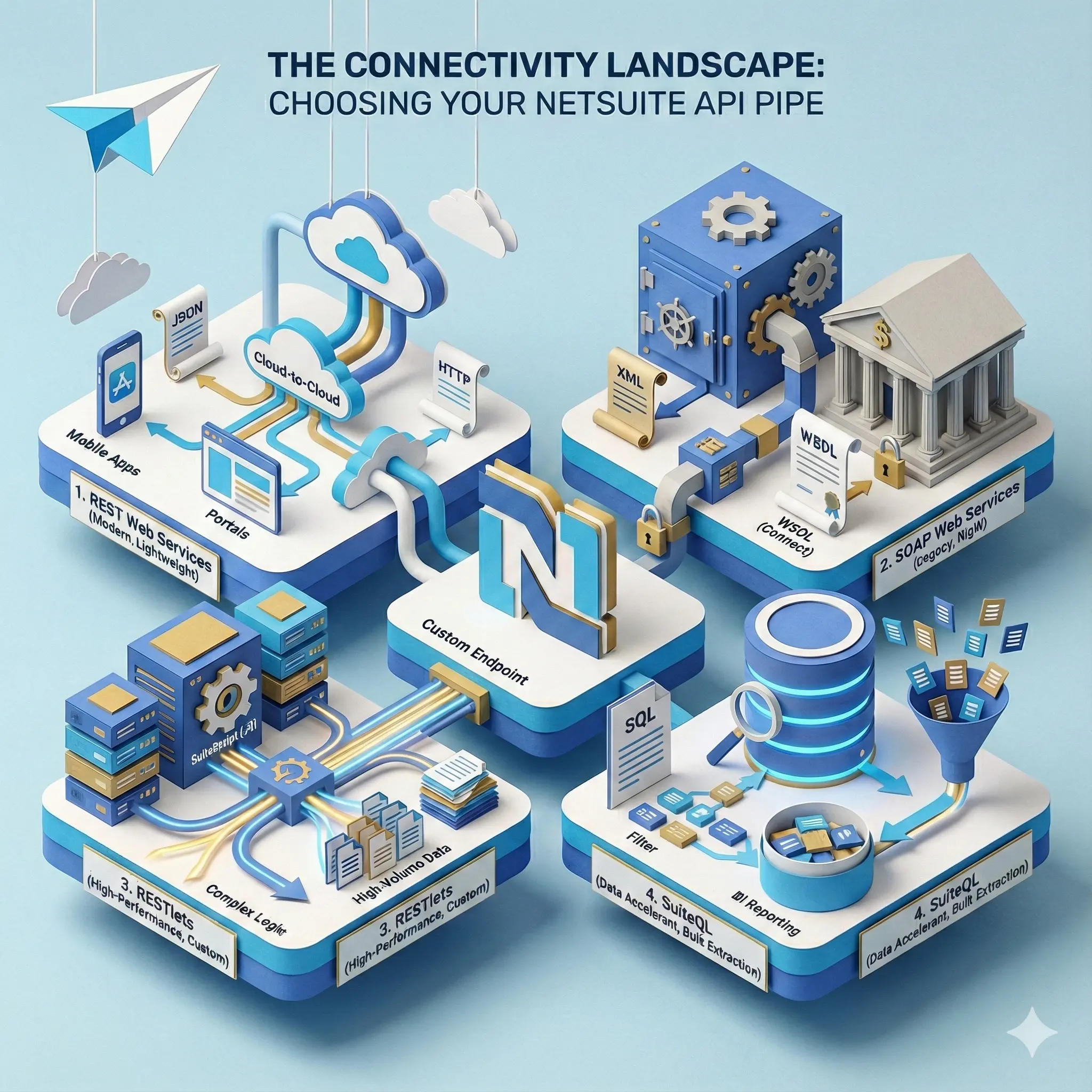
1. SuiteTalk REST Web Services
The modern, lightweight standard for cloud-to-cloud connectivity. REST (Representational State Transfer) is the default choice for most modern applications because it uses standard web protocols and human-readable data formats.
Best For: Standard CRUD operations (Create, Read, Update, Delete).
The Tech: Uses standard HTTP methods and JSON payloads.
Architect Note: Ideal for mobile apps and lightweight external portals that need quick, standard access to records.
2. SuiteTalk SOAP Web Services
The legacy heavyweight, designed for strict, contract-based data exchange. SOAP (Simple Object Access Protocol) is an older protocol that relies on XML. While less flexible than REST, it provides a rigid “contract” (WSDL) that ensures data structure never deviates, which is critical for financial institutions.
Best For: Strict enterprise integrations and banking systems.
The Tech: XML-based with a rigid WSDL (Web Services Description Language).
Architect Note: While “heavier” than REST, SOAP is highly reliable and type-safe. It is often the default for older middleware platforms.
3. RESTlets (“High-Performance” Layer)
The architect’s secret weapon for complex logic and speed. Unlike standard web services which are rigid, a RESTlet is a custom script you write and host inside NetSuite. It allows you to define exactly what data you accept and return, bypassing standard API limitations.
Best For: Complex business logic and high-volume data transfers.
The Tech: Server-side SuiteScript (JavaScript) that acts as a custom API endpoint.
Architect Note: This is the Gold Standard for Architects. You can trigger a complex workflow (e.g., “Find Customer > Check Credit > Create Order > Email Warehouse”) with a single API call, drastically reducing network traffic (“chattiness”).
4. SuiteQL (Data Accelerant)
The SQL-based tool for massive data extraction. SuiteQL allows you to run SQL queries directly against the NetSuite database via the API.
Best For: Bulk data extraction, BI reporting, and complex filtering.
The Tech: SQL-like querying capability over the REST API.
Architect Note: Don’t loop through 10,000 records to find specific data. Use SuiteQL to filter and join data tables before the data ever leaves NetSuite.
Which Method Should You Use?
For more information on this topic, check out our NetSuite API Guide.
Data Integration Architectures: Topology Decisions
Once you have selected your “pipe” (API method), you must decide how the systems will physically connect. In systems architecture, this is called Topology.
Think of topology as the “Road Map” of your data.
Is it a direct road? (Point-to-Point)
Is there a traffic controller in the middle? (Middleware/iPaaS)
Is it a hybrid of both?
This decision is often more important than the tool itself because it dictates your Total Cost of Ownership (TCO). A direct connection is cheap to build today but expensive to maintain tomorrow. A middleware hub is expensive today but saves thousands of hours in maintenance next year.
Use the matrix below to determine which topology fits your maturity level.
NetSuite Data Integration Software Landscape
Now that you have selected your “Pipe” (API method) and your Topology (Architecture), you are ready to select the actual software tool that will drive on the road map.
This is where many businesses make a critical mistake: they buy a truck to drive to the grocery store, or a bicycle to cross the country. The market is divided into four distinct tiers; choosing the right one depends entirely on the complexity of your business logic and your internal technical maturity.
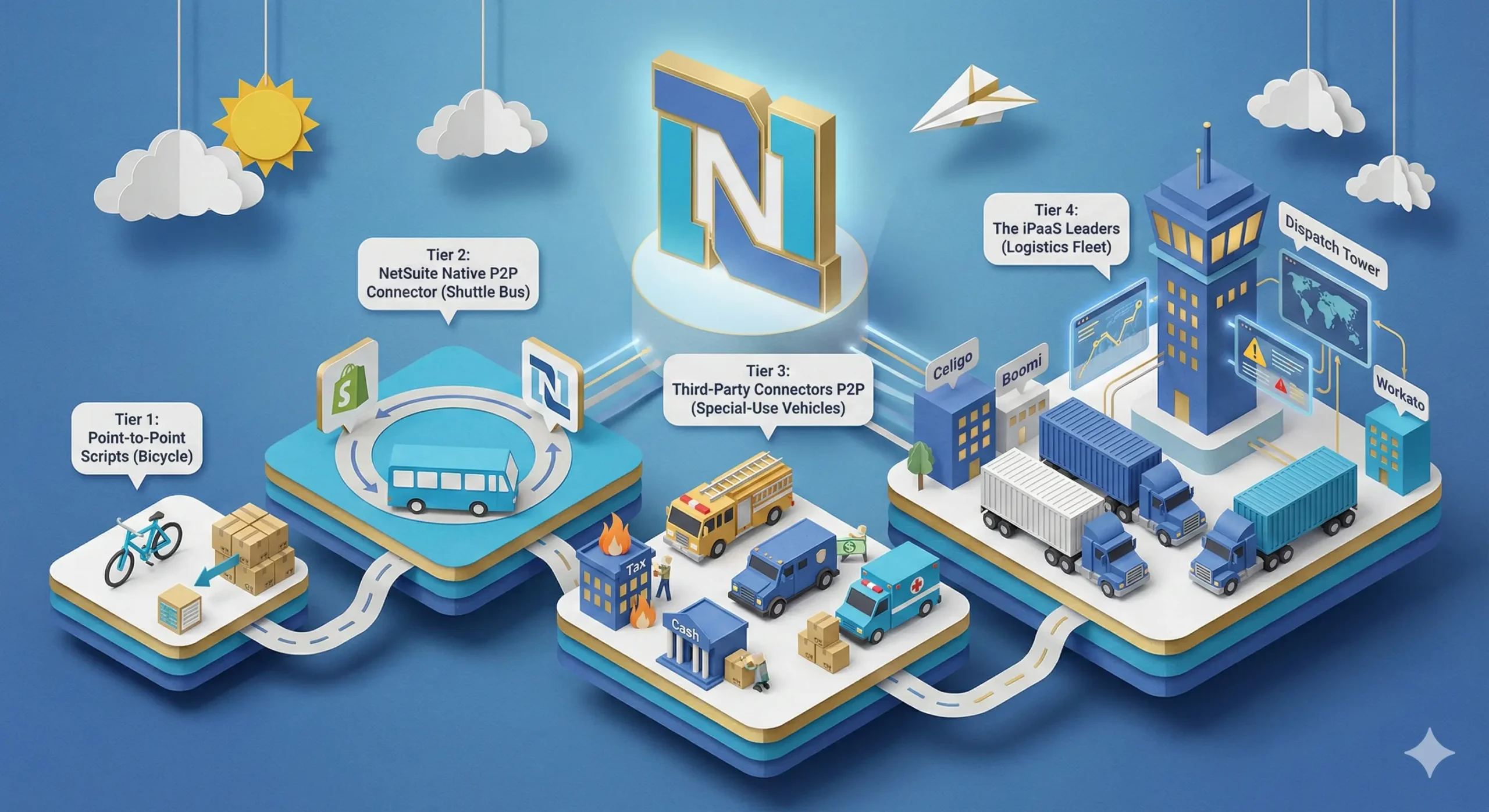
Tier 1: Point-to-Point Scripts (Bicycle)
Custom Scripts: Writing a direct script to connect two systems without middleware.
The Analogy: This is the Bicycle.
Pros: It’s free (no software license, will require development), fast to deploy, and can weave through traffic (highly customizable).
Cons: It has zero cargo capacity. If your data volume spikes (Black Friday), the bicycle tips over. It also has no dashboard—if the rider gets lost (errors), you have no GPS to find them.
Best For: Simple, low-volume tasks, like a “Contact Us” form on your website sending data to NetSuite.
Tier 2: NetSuite Native P2P Connector (Shuttle Bus)
NetSuite Native Connector: Formerly known as “FarApp,” this tool was acquired by Oracle NetSuite. It is not an iPaaS but a dedicated connector specifically for eCommerce and logistics.
The Analogy: This is the Shuttle Bus. It runs a fixed route (e.g., Shopify to NetSuite) perfectly. It is reliable and supported by NetSuite. However, if you need it to stop at a different location (custom logic) or change its route, you are out of luck.
Best For: Companies exclusively using major platforms like Shopify, Amazon, or Walmart with standard workflows.
Tier 3: Third-Party Connectors P2P (Special-Use Vehicles)
Examples: Avalara (Tax), Bill.com (AP), SPS Commerce (EDI), RF-SMART (WMS).
The Analogy: These are your Armored Trucks, Fire Trucks, and Ambulances.
Why: These vehicles are engineered to do exactly one specific job perfectly. You wouldn’t use a general-purpose Semi-Truck (iPaaS) to put out a fire (Tax Compliance) or transport cash (Bank Payments).
Pros: They come fully equipped with the specific tools you need right out of the box (e.g., up-to-date tax tables, banking regulations, or barcode scanning logic).
Cons: They are single-purpose. You cannot use your Fire Truck (Avalara) to move furniture (sync Salesforce contacts). They stay in their lane.
Best For: Complex, highly regulated departmental tasks where “re-inventing the wheel” with a custom integration would be risky or illegal (e.g., Tax and Banking).
Tier 4: The iPaaS Leaders (Logistics Fleet)
iPaaS (Integration Platform as a Service) is the equivalent of running a professional Logistics Fleet.
While a single script (the bicycle) can move a package from A to B, an iPaaS provides the Heavy-Duty Semi-Trucks needed to haul massive cargo (millions of records) without breaking down. But the real value isn’t just the truck—it is the Dispatch Tower (Central Command).
The Trucks (Connectors): These are pre-built vehicles designed to travel between specific cities (e.g., a “NetSuite-to-Salesforce” connector). They are engineered to carry heavy payloads securely.
The Dispatch Tower (The Dashboard): This is the crucial difference. If a truck gets a flat tire (an API error occurs), the driver radios Dispatch. The Command Center sees the alert instantly on a central screen, logs the location, and can automatically “reroute” the traffic or retry the delivery.
Examples:
- Celigo: The “NetSuite-First” choice. Built specifically for the NetSuite ecosystem with pre-packaged “Integration Apps” (e.g., Shopify-to-NetSuite). Best for mid-market speed and ease of use for NetSuite Admins.
- Boomi/Jitterbit: The Enterprise heavy-lifters. Extremely powerful for complex data mapping, EDI, and on-premise to cloud hybrid integrations. Has a steeper learning curve but offer infinite flexibility.
- Workato: The Automation player. Focuses on “Low-Code/No-Code” and “Recipes.” It excels at cross-departmental workflows (e.g., “When a deal closes, message the Sales Manager on Slack”) rather than just pure data sync.
Check out this guide on NetSuite Integration Platforms and Tools for more information on this topic.
The Universal NetSuite Integration Process (6 Steps)
Regardless of the tool you use, follow this lifecycle to ensure stability.
Discovery & Mapping: Create a “Field Map” document. Define the Source of Truth for every field.
Governance Calculation: Calculate your estimated API volume against your NetSuite Service Tier.
Authentication Setup: Configure Token-Based Authentication (TBA). Never use “User/Password.”
Sandbox Build: Build and test flows in the Sandbox environment.
UAT (User Acceptance Testing): Test edge cases (e.g., “What happens if an order has $0 value?”).
Cutover & Monitoring: Deploy to Production and set up alerts for “Dead Letter Queues” (failed records).
For a full break down of these steps check out our guide on the NetSuite Integration Process.
Concurrency, Service Tiers, and Cost
Why do NetSuite data integrations fail during peak seasons? Because they hit the “Speed Limit.” But unlike a highway, you can pay to raise the speed limit in NetSuite—though efficient coding is free.
Understanding Service Tiers & Concurrency
NetSuite operates on a shared multi-tenant infrastructure. To ensure fair usage, they enforce Concurrency Limits—the number of simultaneous API threads allowed at one time. Your limit depends on the “Service Tier” of your NetSuite license.
Tier 3 (Standard): 5 Concurrent Threads.
Tier 2 (Premium): 10 Concurrent Threads.
Tier 1 (Enterprise): 15 Concurrent Threads.
The Cost of Inefficiency: SuiteCloud Plus
If your integration is slow or “chatty” (sending 1,000 individual requests instead of 1 batch of 1,000), you will clog these threads.
The Fix: You can purchase “SuiteCloud Plus” licenses. Each license adds 10 additional concurrent threads to your limit.
The Warning: These licenses are expensive recurring costs.
The Architect’s Job: It is almost always cheaper to optimize your integration code (using batching, asynchronous processing, or RESTlets) than to buy multiple SuiteCloud Plus licenses to mask bad architecture.
Why Optimization Matters
It is not just about saving money on licenses. Inefficient integrations cause Record Locking. If a slow script is holding onto a Customer Record for 10 seconds, no other user or script can edit that customer. This leads to the dreaded RCRD_DSGN_TRG_GRP_MEM_EXIST (Record Collision) error, freezing operations.
For more information on this topic, check out our guide on NetSuite Concurrency Governance.
Integration Security & Authentication
Security is the most overlooked aspect of integration architecture. When you connect a third-party app to NetSuite’s API, you are punching a hole in your firewall. If that hole is not secured properly, you expose your entire customer database and financial ledger.
Modern NetSuite integration relies on three pillars of security: Authentication, Permissions, and Encryption.
1. User/Password
In the past, developers would simply hard-code a username and password into a script. Do not do this.
The Risk: If that password expires or changes, the integration breaks immediately.
The 2FA Problem: NetSuite mandates Two-Factor Authentication (2FA) for all Administrator and high-privilege roles. A script cannot enter a 2FA code, meaning standard login methods will fail for any role with meaningful power.
2. Token-Based Authentication (TBA) & OAuth 2.0
The industry standard for NetSuite is Token-Based Authentication (TBA) (which uses OAuth 1.0) or the newer OAuth 2.0.
How it Works: Instead of a password, you generate a cryptographically secure “Key” and “Secret.”
The Benefit: Tokens never expire (unless you want them to). This ensures your integration runs for years without breaking due to a password reset policy.
Revocability: If a vendor is compromised, you can revoke their specific token instantly without changing anyone’s actual NetSuite password.
3. Role Management
Never use the “Administrator” role for an integration. It is the architectural equivalent of giving a delivery driver the keys to your safe.
The Fix: Create a custom “Integration Role” (e.g., custom_role_shopify_integration).
The Scope: Give this role permission only for the records it needs. If the integration only imports Sales Orders, it should not have permission to view Employee Records or Payroll.
4. IP Whitelisting
For an extra layer of security, configure IP Address Restrictions on the Employee/Integration record.
How it Works: You define exactly which IP addresses are allowed to talk to NetSuite (e.g., the static IP of your iPaaS middleware).
The Benefit: Even if a hacker steals your API tokens, they cannot access your data unless they are physically located inside your middleware’s server network.
For more information on this topic, check out our guide on NetSuite Integration Security.
Common NetSuite Integration Errors
Don’t guess what the error means. Use this lookup table.
Common Use Cases & “Gotchas”
NetSuite integration is not one-size-fits-all. Each department—Sales, Logistics, Finance—has specific architectural patterns and data requirements.
eCommerce Integration
Overview: This integration automates the “Order-to-Cash” cycle. It ensures that when a customer buys online, the order flows instantly to the warehouse, and inventory levels are updated on the website to prevent overselling.
The Flow:
Order Import: Web Store → NetSuite (Creates Sales Order).
Inventory Sync: NetSuite → Web Store (Updates Quantity Available).
Fulfillment Export: NetSuite → Web Store (Updates Status to “Shipped” + Tracking #).
The Gotcha (Refunds): Many native connectors fail to sync Refunds back to NetSuite automatically. This often requires a custom flow to properly create a “Credit Memo” and “Customer Refund” in NetSuite, as the logic is more complex than a simple order import.
Optimization: Use “Delta Syncs” for inventory. Only send items that have changed in the last 15 minutes, rather than pushing the entire catalog every hour
CRM Integration (Salesforce / HubSpot)
Overview: This aligns the Sales team (CRM) with the Finance team (NetSuite). It creates a seamless “Lead-to-Cash” process where a closed deal in Salesforce automatically triggers billing and revenue recognition in NetSuite.
- The Flows:
Customer Sync: Bidirectional sync of contact info (Salesforce owns Address; NetSuite owns Credit Terms).
Opportunity Sync: Salesforce “Closed/Won” Opportunity → NetSuite Sales Order.
- Financial Visibility: NetSuite Invoice/Payment Status → Salesforce (so reps can see if clients paid).
- The Gotcha (CPQ Bundles): If you use Salesforce CPQ, “Bundle” items must match NetSuite “Kit/Assembly” items exactly. If the component items inside the bundle don’t align perfectly, the order import will fail.
3PL & Shipping Integration
Overview: This connects NetSuite to external warehouses (3PLs) or shipping software (like ShipStation). It allows you to outsource fulfillment while keeping NetSuite as the central inventory record.
The Flows:
Fulfillment Request: NetSuite “Item Fulfillment” → 3PL WMS (Warehouse Management System).
Shipment Confirmation: 3PL WMS → NetSuite (Write-back of Tracking Number & Cost).
- The Gotcha (Write-Backs): The most critical failure point is the “Write-Back.” If the 3PL ships the item but the integration fails to update NetSuite with the tracking number, the customer never gets their “Your Order Has Shipped” email, leading to support tickets.
When to Integrate: Day 1 vs. Phase 2
One of the most critical decisions an architect makes is when to turn the integrations on.
The Case for “Day 1” Integration
Scenario: You go live with NetSuite and your integrations (Shopify, Salesforce, 3PL) simultaneously.
Pros: High user adoption. Users trust the system immediately because data is accurate. No manual “dual entry” required.
Cons: Higher risk. If the integration fails on Day 1, shipping stops. Requires a longer testing phase, potentially pushing back your Go-Live date by 4-8 weeks.
The Case for “Phase 2” Integration
Scenario: You go live with NetSuite manually first (using CSV imports), then build integrations 3 months later.
Pros: Low risk. You ensure NetSuite core processes work before adding complexity. Faster initial Go-Live.
Cons: The “Valley of Despair.” Your staff must manually enter data into two systems (e.g., entering an order in Shopify AND NetSuite). This creates data errors, burnout, and resentment toward the new system.
Architect’s Verdict: Integrate High-Volume Flows on Day 1. (e.g., Orders). Delay Low-Volume Flows to Phase 2 (e.g., Vendor updates).
NetSuite Integration Costs: What to Expect
Budgeting for integration is often underestimated. You are not just paying for a tool; you are paying for Throughput (NetSuite side), Middleware (Tool side), and Labor (Implementation).
1. Throughput Costs
NetSuite does not charge per API call, but they limit your speed.
Standard Tier: Included in your license. Good for low volume.
SuiteCloud Plus License: If you need to process high volumes (e.g., 5,000+ orders/hour), you may need to buy these licenses to increase your concurrency.
Estimated Cost: ~$7,000 – $10,000 per year per license (Pricing varies by contract).
2. Middleware / Tool Costs
iPaaS (Celigo/Boomi): Subscription based on the number of “Endpoints” (systems connected) or “Flows” (processes).
Estimated Cost: $3,000 – $50,000+ per year depending on complexity.
Native Connectors (Shopify/Amazon): Usually cheaper, flat fees.
Estimated Cost: $1,500 – $5,000 per year.
3. Implementation Labor
Simple P2P Script: $2,000 – $5,000 (One-off).
Standard iPaaS Setup (eCommerce): $10,000 – $25,000.
Complex Enterprise Architecture: $50,000 – $150,000+.
NetSuite Integration Partners: Do You Need One?
Even with the best tools, integration is a specialized skill. A general NetSuite Administrator may be excellent at building Saved Searches but may lack the coding skills (SuiteScript) or architectural experience to build a fault-tolerant integration.
Why Hire a Partner?
Complexity vs. Capability: If your integration requires custom RESTlets or complex “Hybrid” logic, you need a partner with specialized integration experience.
Risk Mitigation: A partner has likely connected Salesforce to NetSuite 100 times. They know the edge cases (like “CPQ Bundle” failures) that will take your in-house team weeks to discover.
Speed to Value: Partners bring pre-built code libraries. Instead of writing authentication scripts from scratch, they deploy their standard patterns in hours.
How to Choose the Best Partner
Not all partners are equal. Use this checklist to vet them:
1. The “Scripting” Test: Ask if they have in-house SuiteScript 2.x developers or if they outsource coding. Avoid partners who only know how to configure “drag-and-drop” tools but cannot write custom code when the tool hits a wall.
2. Industry Specificity: If you are a manufacturer, ask for a partner with EDI experience (SPS/TrueCommerce). If you are a SaaS company, ask for a partner who specializes in Subscription Billing and Salesforce integrations.
3. The Support Model: Integration is not a “set it and forget it” project. APIs change. Ask: “What is your SLA (Service Level Agreement) if the integration breaks on Black Friday?”
4. Methodology: Do they build in Sandbox first? Do they require a “Field Mapping” sign-off before coding? (If they skip these steps, run).
For more information on this topic, check out our guide on how to choose the right NetSuite Integration Partner.
Frequently Asked Questions
Q: Does NetSuite have an API? A: Yes. NetSuite provides a robust API platform called SuiteTalk, which includes both REST (JSON-based) and SOAP (XML-based) web services. Additionally, it offers RESTlets, which allow developers to create custom API endpoints using server-side JavaScript to handle specific business logic.
Q: What are the integration units of NetSuite? A: In NetSuite governance, “units” (often called Governance Points) measure the computational cost of a script or integration. Every API operation costs a certain number of units (e.g., creating a record might cost 10 units, while a search costs 5). If a script exceeds its total unit budget (e.g., 1,000 units for a user event script), it triggers an SSS_USAGE_LIMIT_EXCEEDED error.
Q: What is the difference between a Suitelet and a RESTlet? A: RESTlets are designed for raw data transfer (JSON/XML) and are ideal for integration. Suitelets are primarily designed to create custom UI pages within NetSuite, though they can be used for integration (but are generally slower and less secure).
Q: Can I connect HubSpot directly to NetSuite? A: Yes, HubSpot offers a “Data Sync” feature. However, for enterprise needs (custom objects, complex revenue recognition rules), an iPaaS solution (like Celigo or Workato) provides more control than the native sync.
Q: Can I connect NetSuite directly to Excel? A: Yes, there are three common ways to do this, depending on your needs:
Web Query (Basic): You can export a Saved Search as a “Web Query” file, which allows Excel to refresh the report data using your NetSuite login.
SuiteAnalytics Connect (Advanced): This requires the ODBC/JDBC driver (an extra module). It allows you to connect Excel to NetSuite via ODBC and query tables using SQL.
- Third-Party Tools (Recommended for Finance): Tools like CloudExtend or Solution 7 offer the best experience. They allow for bi-directional syncing, meaning you can edit data in Excel and push updates back into NetSuite—something standard exports cannot do.
Conclusion: The Integration Imperative
NetSuite is a powerful engine, but an engine without fuel is just a heavy piece of metal. In the digital age, data is that fuel.
The difference between a company that scales effortlessly and one that drowns in operational overhead often comes down to the quality of their “plumbing.” A well-architected integration strategy does more than just move data; it liberates your team from the drudgery of manual entry, accelerates your cash flow, and provides the real-time visibility needed to make critical decisions.
As you plan your roadmap for 2026 and beyond, remember that integration is not a one-time IT ticket—it is a continuous operational strategy. Whether you choose the speed of a RESTlet, the reliability of an iPaaS, or the simplicity of a Native Connector, the goal remains the same: to build a system where data flows as freely as your business ambitions.
