
Why NetSuite Implementations Fail (2026): 8 Critical Risks & How to Prevent Them
A NetSuite implementation is likely one of the most significant capital investments your company will make this decade. It promises streamlined operations, real-time financial visibility, and scalability. Yet, industry analysis suggests a staggering percentage of ERP projects fail to achieve their original objectives, go vastly over budget, or are abandoned entirely.
For CFOs, CIOs, and project sponsors, the anxiety is justified. A failed implementation isn’t just a sunk cost; it’s an operational hazard that can paralyze billing, cripple supply chains, and damage careers.
If you search for “why NetSuite implementations fail,” most partners will provide generic answers: “poor communication,” “lack of planning,” or “insufficient budget.” While these are symptoms, they are rarely the root cause.
As an authority in complex ERP deployments, we have analyzed countless distressed projects to identify the structural flaws that actually derail implementations. This article outlines the seven critical, often hidden, risks that cause failure and provides the specific prevention protocols necessary to ensure your project is a success.
For more information about implementations, you can check out our General NetSuite Implementation Guide.
What Constitutes a NetSuite Implementation Failure?
Before diagnosing the causes, we must define failure. It is rarely as simple as the software “not working.”
A NetSuite implementation is considered a failure when the deployed system does not meet defined critical business requirements, exceeds the original budget by more than 25%, or results in significant, prolonged operational disruption post-go-live.
Often, a “failed” project goes live, but the organization is forced to rely on Excel workarounds outside the system because the implementation didn’t solve the core business problems.
The Overarching Theme: “Native First” vs. Technical Debt
The common thread across almost all failed implementations is a refusal to adapt business processes to modern best practices.
NetSuite is designed based on thousands of successful use cases. A successful implementation involves changing your processes to fit NetSuite’s “native” functionality at least 80% of the time. A failed implementation attempts to bend NetSuite to match legacy, inefficient processes through excessive coding. This creates “Technical Debt”—a brittle system that is expensive to maintain and breaks with every NetSuite update.
8 Critical NetSuite Implementation Risks (& Prevention Protocols)
The following eight risks are the structural landmines that most frequently blow up project timelines and budgets.
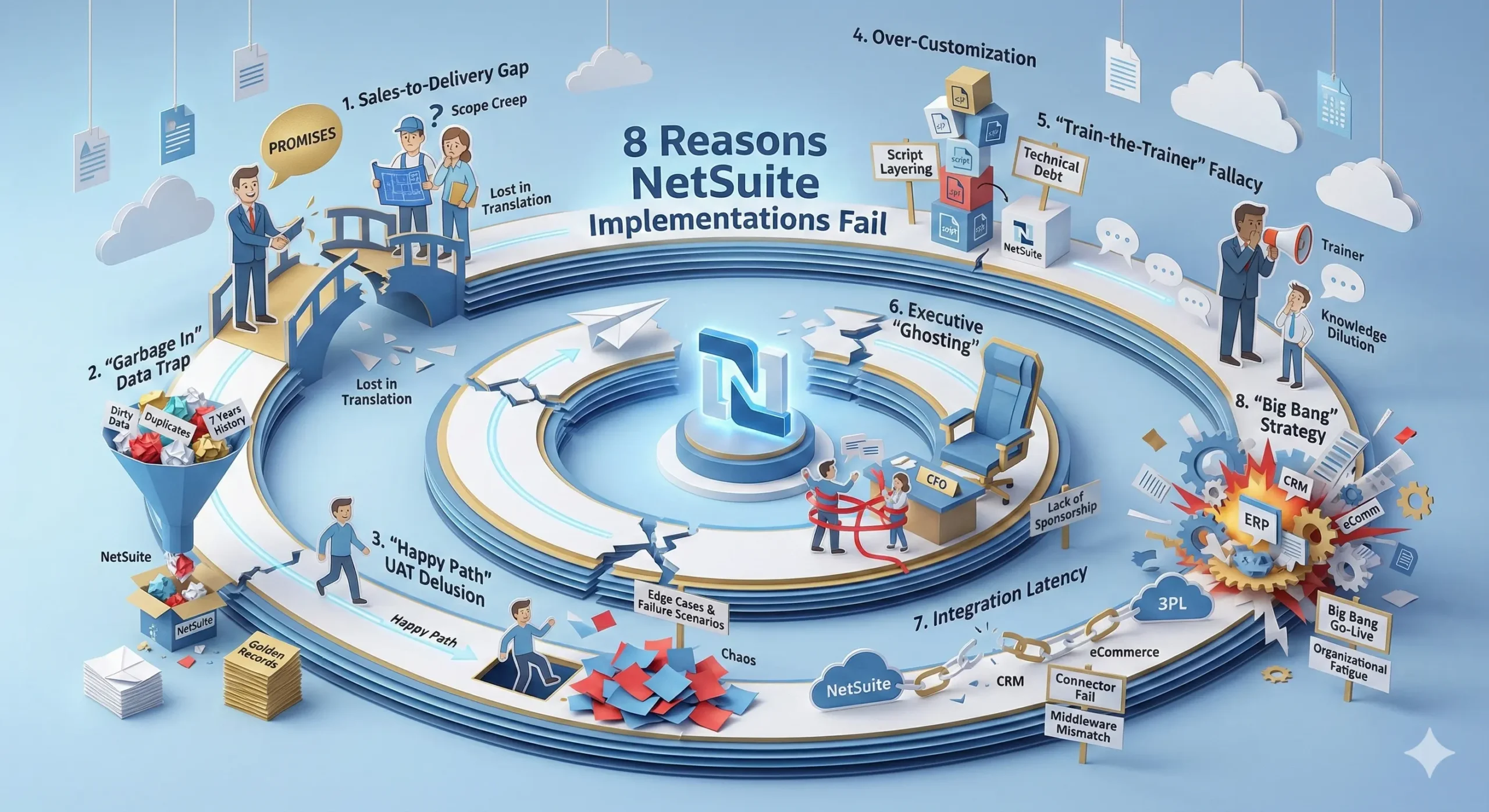
1. “Sales-to-Delivery” Gap (Scope Creep)
This is the earliest point of failure. The team that sells you NetSuite (Sales Engineers) is rarely the team that implements it (Professional Services).
Failure Mode: During the sales cycle, verbal promises are made to close the deal—“Yes, the system handles that complex multi-tier commission structure natively.” These promises often get lost in translation. When the delivery team arrives, they work off the standard Statement of Work (SOW), not the verbal promises made during the demo. This leads to immediate frustration, friction, change orders, and budget bloat before the project even really begins.
Prevention Protocol:
Mandate a “Sales Handoff”: Contractually require the lead Sales Engineer to attend the first two weeks of the requirement gathering (Discovery) phase to validate their promises against the technical design.
Record Demos: Use call recording software during the sales process and attach specific demo timestamps to your contract as an addendum to ensure accountability.
2. “Garbage In” Data Trap
Data migration is almost always more complex and time-consuming than anticipated. It is the number one cause of go-live delays.
Failure Mode: Companies often attempt to migrate too much history from legacy systems (e.g., QuickBooks, Sage, Excel). The failure happens when teams try to migrate transactional history (e.g., 7 years of individual invoices) rather than summarized balances. Legacy data is often “dirty”—containing duplicate customers, obsolete items, or inconsistent formatting. Importing this clogs the new NetSuite environment, causing financial reports and inventory counts to break on Day 1.
Prevention Protocol:
The “Static vs. Dynamic” Rule: Only migrate “Static” “Golden Records” (clean Customers, Vendors, Items) in full. For “Dynamic” data (Transactions), migrate only Open Balances (AR/AP) and summary Monthly Journal Entries for historical reporting.
Mandatory Mock Conversion: Do not wait for UAT to test data. Schedule a full “Mock Conversion” at least 4 weeks prior to go-live to validate the General Ledger impact.
3. “Happy Path” UAT Delusion
User Acceptance Testing (UAT) is the most critical phase for risk mitigation, yet it is where most failures originate.
Failure Mode: Users, busy with their day jobs, typically test the “Happy Path”—the perfect scenario where an order is placed, stock exists, and credit cards clear. They fail to test the “Edge Cases” and failure scenarios. When real-world chaos hits on Go-Live day—partial returns, credit limit breaches, out-of-stock backorders, complex tax exemptions—operations grind to a halt because the system wasn’t configured to handle them.
Prevention Protocol:
Script “Negative Testing”: Do not just test if it works; test if it breaks correctly. Force users to run failure scenarios. Example: “Attempt to ship an order to a customer currently on Credit Hold and ensure the system blocks the fulfillment.”
Scorecarding: Gamify UAT by tracking “Bugs Found” per department. If a department finds zero bugs, it is a red flag that they did not test thoroughly enough.
4. Over-Customization (Technical Debt)
NetSuite is highly customizable via its powerful SuiteScript platform. This is both its greatest strength and its biggest risk.
Failure Mode: Inexperienced partners or internal IT teams often write scripts as a first resort to force NetSuite to mimic an old system’s bad habits. This creates “Script Layering,” where multiple custom scripts conflict with each other. The result is a system that is slow, buggy, and expensive to maintain. Furthermore, NetSuite’s bi-annual automatic upgrades often break poorly written custom code, requiring expensive emergency developer hours to fix.
Prevention Protocol:
The Governance Board: Establish a governance board that rejects any customization request unless the requester can prove the native NetSuite workflow causes a significant revenue loss or compliance breach.
Standard vs. Custom Hierarchy: Always exhaust NetSuite’s configuration options (Custom Fields, Saved Searches, and SuiteFlow workflows) before authorizing custom coding (SuiteScript).
5. “Train-the-Trainer” Fallacy
Training is often the first budget item cut when costs rise, leading to disastrous results.
The Failure Mode: To save money, many implementations rely on a “Train-the-Trainer” model, where the partner trains your managers, who are then tasked with training their staff. In reality, managers are often too busy with their regular duties during implementation to become effective educators. The critical knowledge “dilutes” like a game of telephone. By Go-Live, the actual end-users doing the data entry are unprepared, leading to massive errors and immediate resistance to the new system.
Prevention Protocol:
Role-Based End-User Training: Budget for the implementation partner to train the actual end-users directly. This training must be segmented by role (e.g., “AP Clerk Training” is entirely different from “Controller Training”).
“Day in the Life” SOPs: Require the creation of Standard Operating Procedure cheat sheets specific to your company’s workflow, rather than relying on generic NetSuite manuals.
6. Executive “Ghosting” (Sponsorship)
An ERP project is a business transformation project, not an IT project. It requires executive horsepower.
Failure Mode: The CFO or COO signs the check but delegates the entire project execution to an IT Manager or lower-level Admin. When difficult decisions inevitably arise—such as changing a 20-year-old billing process to fit NetSuite’s best practices—the project manager lacks the political authority to enforce the change across departments. The project stalls in “analysis paralysis” as stakeholders argue over processes.
Prevention Protocol:
The Steering Committee Charter: Establish a mandatory bi-weekly Steering Committee meeting where the Executive Sponsor must be present to break ties, enforce process changes, and make final “Go/No-Go” decisions.
7. Integration Latency & Middleware Mismatch
In today’s ecosystem, NetSuite must connect to CRMs (Salesforce), eCommerce (Shopify/Magento), and 3PLs. The method of connection matters.
Failure Mode: A common failure point is using cheap, “point-to-point” connectors or plugins that cannot handle high transaction volumes. During a peak period (like Black Friday or end-of-month close), the connector throttles or fails. Orders don’t sync to NetSuite, inventory counts drift between systems, and you end up overselling product you don’t have.
Prevention Protocol:
Stress Test Volume: During UAT, simulate 3x your historical peak transaction volume to ensure the integration doesn’t create a backlog queue.
Use Enterprise Middleware: For any reasonable volume, avoid simple plugins. Invest in robust iPaaS (Integration Platform as a Service) solutions like Celigo or Boomi that feature robust error handling, data transformation capabilities, and “retry” logic.
8. “Big Bang” Implementation Strategy
Many companies view NetSuite as a silver bullet and attempt to replace their entire tech stack (ERP, CRM, eCommerce, Payroll, and WMS) simultaneously on Day 1.
Failure Mode: This approach causes “organizational fatigue.” Your internal team has a finite amount of bandwidth. If they are forced to validate financial data, design new sales workflows, and test a new website checkout all in the same month, they will burn out. Attention to detail fractures, and critical errors slip through. In a “Big Bang” go-live, if one peripheral system fails (e.g., the eCommerce connector), it often delays the entire project, holding the core financial system hostage.
🛡️ Prevention Protocol:
Adopt “Crawl, Walk, Run”: Structure the project into strict phases. Phase 1 should be the “Minimum Viable Product” (MVP)—typically Core Financials, Inventory, and Order Management (the things you need to bill customers and pay bills).
Push Peripherals to Phase 2: CRM, Advanced Manufacturing, and complex eCommerce integrations should often be scheduled for 3–6 months after the core ERP is stable. This allows the team to master the basics before adding complexity.
How to Rescue a Failing NetSuite Implementation
If you are currently in the midst of an implementation that is spiraling, you must act immediately to “stop the bleeding.”
Pause Custom Development: Implement an immediate freeze on all new scripting.
Audit the Script Logs: Have a neutral third-party expert review the Execution Logs to identify which scripts are causing performance drags or errors.
Re-engage Executive Sponsorship: The CFO or CEO must step back into daily meetings to realign the project goals with business reality.
Simplify Scope to MVP: Descope non-essential “nice-to-haves.” Focus intensely on a Minimum Viable Product (MVP) that allows you to ship product and bill customers. Everything else is “Phase 2.”
NetSuite Implementation Failure FAQs
Q: What is the primary reason most NetSuite implementations go over budget? A: Scope creep resulting from a failure to adhere to “native” NetSuite functionalities. When companies insist on customizing the system to match old processes rather than adopting new ones, development costs explode.
Q: Should we hire a NetSuite Administrator before implementation? A: Yes. Hiring an experienced internal NetSuite Admin before the project starts is one of the best investments you can make. They act as your internal advocate, keeping the implementation partner honest and ensuring your team is prepared to own the system post-go-live.
Q: How much does a “NetSuite Rescue” typically cost? A: Recovering a failed implementation is almost always more expensive than doing it right the first time. A typical rescue project costs 50% to 150% of the original implementation budget, as it involves auditing broken scripts, cleaning corrupted data, and retraining staff who have lost faith in the system.
Q: Is it better to implement with NetSuite Direct (Oracle) or a Solution Partner? A: It depends on your internal resources. NetSuite Direct often uses a standardized “SuiteSuccess” methodology which is efficient but rigid. Solution Partners typically offer more white-glove service, industry-specific expertise, and flexibility, but quality varies wildly. For complex or highly niche businesses, a specialized Partner is often the safer choice.
Q: How much does a “NetSuite Rescue” typically cost? A: Recovering a failed implementation is almost always more expensive than doing it right the first time. A typical rescue project costs 50% to 150% of the original implementation budget, as it involves auditing broken scripts, cleaning corrupted data, and retraining staff who have lost faith in the system.
Q: How long does a typical NetSuite implementation take? A: While NetSuite’s “SuiteSuccess” methodology touts timelines as short as 100 days, a complex implementation for a mid-market company typically takes 6 to 9 months. Projects stretching beyond 12 months are usually in distress and suffering from “analysis paralysis.”
Q: What is “Hypercare” and why do we need it? A: “Hypercare” is the period (usually 30–60 days) immediately following Go-Live where the implementation partner provides intensive, rapid-response support. Skipping or shortening Hypercare to save money is a critical error; this is the period where most user adoption issues and critical bugs are discovered and resolved.
Q: What are the early warning signs that our implementation partner is failing? A: Major red flags include:
High turnover: Your project manager or consultant changes multiple times.
Lack of documentation: They cannot produce a “Solution Design Document” (SDD) detailing how requirements map to NetSuite features.
“Yes” to everything: A partner who never pushes back on your customization requests is likely building technical debt, not a sustainable solution.
Conclusion: Turning Risk into Resilience
NetSuite is arguably the most powerful cloud ERP on the market, but it is not a magic wand. It is a sophisticated tool that reflects the quality of the planning, data, and processes you feed into it.
The statistics on ERP failure are daunting, but they are not destiny. As we have explored, the reasons for failure are rarely mysterious “black swan” events. They are predictable, structural flaws—dirty data, unchecked scope creep, insufficient testing, and the “Big Bang” mentality—that can be identified and neutralized long before your go-live date.
Success requires a shift in mindset. You must stop viewing your implementation as an IT project to be delegated and start viewing it as a business transformation to be led. It requires the discipline to say “no” to unnecessary customizations, the rigor to test for failure, and the wisdom to prioritize a stable Phase 1 over a perfect Phase 2.
Your goal is not just to “go live.” The goal is to build a scalable digital foundation that grows with your business for the next decade. By acknowledging these seven risks and adopting the prevention protocols outlined above, you move your project out of the danger zone and onto the path of operational excellence.
Is Your NetSuite Project at Risk?
Don’t wait for the cutover date to find out if your implementation is on track. Contact our NetSuite Implementation Rescue Team today for a confidential audit of your current project status, script architecture, and data migration plan. Ensure your investment delivers the ROI you were promised.
