The Executive’s Guide to Oracle NetSuite Cloud ERP 2026: Architecture, Pricing & Implementation
Enterprise Resource Planning (ERP) migrations are among the most high-stakes initiatives a business will undertake. They are not merely IT projects; they are fundamental operations overhauls. This guide is architected for CFOs, CIOs, and Operational Leaders who are evaluating NetSuite or currently navigating its ecosystem.
We move beyond the marketing brochures to dissect the actual architecture of the platform. In this guide, you will learn:
- The Architecture: How the SuiteCloud platform supports customization without breaking upgrades.
- The Cost Structure: How to decode the complex licensing matrix and avoid hidden service tier fees.
- The Implementation Reality: The difference between a “SuiteSuccess” deployment and a traditional waterfall approach.
- The Ecosystem: How to leverage partners, developers, and administrators to build a system that scales.
Whether you are migrating from QuickBooks, Microsoft Dynamics, or legacy on-premise systems, this page serves as your central “Single Source of Truth” for NetSuite validation.
What is NetSuite Cloud ERP?
NetSuite is the world’s leading unified, cloud-based Enterprise Resource Planning (ERP) platform. It consolidates core business processes—financials, CRM, ecommerce, inventory, and professional services—into a single, real-time database. Unlike legacy systems that require on-premise servers and disjointed spreadsheets, NetSuite is a true multi-tenant SaaS (Software as a Service) solution, meaning all customers run on the same version of the code, automatically upgraded twice a year.
Why is NetSuite So Popular?
NetSuite’s dominance in the mid-market ($10M – $500M revenue) stems from its “True Cloud” architecture. While competitors often take legacy on-premise software and host it on a cloud server (fake cloud), NetSuite was born in the cloud. This ensures that customizations do not break when the software updates. It allows businesses to scale from a small startup to a global IPO without ever needing to “rip and replace” their core financial engine.
NetSuite Benefits
1. All-in-one solution: NetSuite offers a wide range of business management capabilities in a single system, including accounting, CRM, e-commerce, inventory management, and more. This can help businesses streamline their operations and improve efficiency.Of course! Log in from anywhere, no server maintenance, secure, reliable, and can grow with you.
2. Scalability: NetSuite can be easily scaled up or down to meet the changing needs of a business, making it a good choice for businesses that experience fluctuations in demand or are experiencing rapid growth.
3. Customizable: The platform has many development options and a community of third-party developers that build dozens of “bundles” available for NetSuite users.
4. Integratabtle: NetSuite can connect to most other applications, databases, public and private API’s
5. User-friendly interface: NetSuite has a user-friendly interface that makes it easy for employees to navigate and use the system, reducing the learning curve and improving productivity.
6. Mobile accessibility: NetSuite can be accessed from mobile devices, allowing employees to stay connected and work remotely.
7. Advanced reporting and analytics: NetSuite provides advanced reporting and analytics capabilities that can help businesses track key performance indicators, identify trends and patterns, and make more informed decisions.
8. Industry-specific functionality: NetSuite offers industry-specific functionality that is tailored to the needs of specific sectors, such as retail, manufacturing, and healthcare.
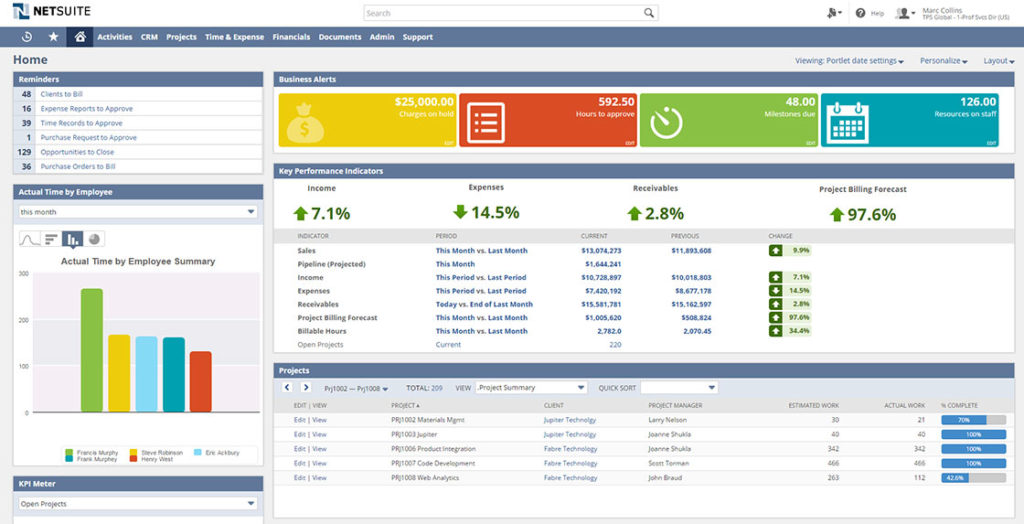
10. UI – NetSuite’s dashboard setup spoils administrators with critical information elegantly and optimally displayed visually
Who is NetSuite For?
NetSuite is ideally suited for rapidly growing mid-market companies that have outgrown introductory accounting software like QuickBooks or Xero. It is the platform of choice for:
Software/SaaS Companies (Complex revenue recognition).
Wholesale Distributors (Multi-location inventory).
Manufacturing (Work orders and supply chain).
Retail/E-commerce (Omnichannel sales).
Private Equity-backed firms preparing for an exit or IPO.
Core NetSuite Modules
NetSuite is modular by design. You do not buy a monolith; you buy a core platform and attach “Modules” like building blocks. This allows you to pay only for the functionality your specific industry requires.
Accounting & Finance (The ERP Core)
This is the foundation of the system. It replaces your general ledger and manages the “Record to Report” process.
Features Include:
- General ledger: NetSuite provides a central repository for financial data, including account balances, transactions, and budgets.
- Accounts payable: NetSuite automates the process of paying bills and tracking vendor payments, including the creation of purchase orders and the recording of invoices.
- Accounts receivable: NetSuite helps businesses manage their accounts receivable, including the creation of invoices, the tracking of customer payments, and the management of collections.
- Bank reconciliation: NetSuite allows businesses to reconcile their bank accounts with their financial records, ensuring that transactions are properly accounted for and discrepancies are identified.
- Financial reporting: NetSuite provides a range of financial reports, including balance sheets, income statements, and cash flow statements, to help businesses track their financial performance and make informed decisions.
- Cash Management: Allows you to manage your company’s cash flow, including bank account reconciliation and forecasting.
- Budgeting: Allows you to create and track budgets, compare actual results to budgeted amounts, and analyze variances.
- Fixed Asset Management: Allows you to track and manage your company’s fixed assets, including depreciation calculations and asset disposals.
- Revenue Recognition: Allows you to manage and recognize revenue in accordance with accounting standards, including support for the new revenue recognition standards (ASC 606 and IFRS 15).
- Multi-Currency: Allows you to conduct financial transactions in multiple currencies and automatically converts between them using current exchange rates.
- Audit Trail: Provides a comprehensive record of all financial transactions, making it easy to track changes and perform audits.
- Tax calculation: NetSuite can automatically calculate and apply appropriate tax rates to transactions based on the location of the customer or vendor and the type of goods or services being purchased.
- Tax reporting: NetSuite can generate tax reports, such as sales tax reports and VAT reports, to help businesses meet their reporting obligations.
- Tax compliance: NetSuite can help businesses stay up-to-date with changing tax laws and regulations, and can alert businesses to potential compliance issues.
- Tax filing: NetSuite can assist with the preparation and filing of tax returns, including the submission of electronic tax forms.
NetSuite Inventory Management
For product-based businesses, this module is the operational brain. It moves beyond simple tracking to “Intelligent Supply Chain.”
Features Include:
- Item Management: Allows you to create and manage your company’s inventory items, including item numbers, descriptions, pricing, and images.
- Inventory Management: Allows you to track and manage your company’s inventory levels, including reordering and replenishment.
- Bin Management: Allows you to track and manage inventory within specific storage locations (bins) within a warehouse.
- Lot and Serial Number Tracking: Allows you to track and manage inventory using unique lot or serial numbers.
- Drop Shipments: Allows you to manage and track orders that are fulfilled directly by vendors.
- Intercompany Transactions: Allows you to track and manage inventory movements between different entities within your company.
NetSuite Order Management
This module orchestrates the “Order-to-Cash” lifecycle. It ensures that when a customer buys something, the system validates the pricing, checks inventory availability, and routes the order to the correct fulfillment center automatically. It handles complex scenarios like drop-shipping, partial fulfillment, and matrix pricing rules.
Features Include:
- Order Entry: Allows you to create and manage customer orders, including creating quotes, entering orders, and processing returns.
- Order Fulfillment: Allows you to manage the fulfillment process for customer orders, including picking, packing, and shipping.
- Returns Management: Allows you to manage and track customer returns, including processing returns and issuing credits or replacements.
- Customer Management: Allows you to track and manage customer information, including contact details, order history, and customer notes.
- Pricing and Discounting: Allows you to create and manage custom pricing and discounting rules for your products and services.
- Quotes and Proposals: Allows you to create and manage quotes and proposals for potential customers.
- Subscriptions: Allows you to manage recurring orders and subscription billing.
- Customer Self-Service: Provides a customer portal that allows your customers to place orders, track shipments, and view their order history.
Purchasing and Receiving
This handles the “Procure-to-Pay” workflow. It allows organizations to enforce spend management
Features Include:
- Purchase order creation: The module allows users to create and manage purchase orders for items and services.
- Vendor management: Users can manage vendor information, including contact details, payment terms, and preferred shipping methods.
- Inventory management: The system includes tools for tracking inventory levels, replenishing stock, and managing demand forecasts.
- Receiving goods: Users can track the receipt of goods and compare them to the original purchase order to ensure accuracy.
- Invoicing and payment: The module includes tools for managing invoices and payments, including integration with financial software.
NetSuite Project Management
For service-based companies, this module tracks the “Bid-to-Bill” lifecycle. It links project tasks directly to the timesheets and expenses that drive billing. It allows project managers to track “Percent Complete” and profitability in real-time, integrating seamlessly with the General Ledger for revenue recognition.
Features Include:
- Project planning and scheduling: Users can create and manage project schedules, including tasks, resources, budgets, and milestones.
- Resource management: The module includes tools for managing and allocating resources, including personnel, equipment, and materials.
- Budget tracking: Users can track project budgets, including actual costs and variances from the original budget.
- Time and expense tracking: The system includes tools for tracking time and expenses, including integration with time sheets and expense reports.
- Collaboration: The module includes tools for collaborating with team members, including communication, file sharing, and task assignments.
- Task dependencies: The module may allow users to specify dependencies between tasks, such as one task being dependent on the completion of another task.
- Risk management: Users may be able to identify and manage risks associated with projects, including the ability to assign risk owners and create risk mitigation plans.
- Change management: The module may include tools for tracking and managing changes to projects, including the ability to create change requests and track their approval process.
- Document management: Users may be able to store and manage project-related documents, including contracts, proposals, and specification sheets.
- Project templates: The module may allow users to create and use templates for common types of projects, making it easier to set up new projects.
Employee Management
- Employee records: The module allows users to create and manage employee records, including personal and professional information, job titles, and salary details.
- Time and attendance tracking: Users can track employee time and attendance, including clocking in and out, scheduling shifts, and managing time off requests.
- Payroll: The module includes tools for calculating and issuing employee pay, including integration with payroll tax and benefits systems.
- Performance management: Users can create and manage employee performance evaluations, including setting goals, tracking progress, and providing feedback.
- Talent management: The module may include tools for recruiting and onboarding new employees, as well as managing employee training and development.
- Policy and compliance: The system may include tools for managing employee policies and compliance with laws and regulations, such as equal employment opportunity and workplace safety.
Popular NetSuite Add-on Modules
NetSuite has added many “modules” to their offering since inception. Each module expands on the functionality of NetSuite while keeping the data and back-end completely integrated. Modules are sold separately or added in specific packages that can be put together for you based on your needs. For a complete list of all NetSuite modules and more info on what they can do for your business, click HERE.
NetSuite CRM
Unlike Salesforce, NetSuite CRM is embedded in the ERP. This means sales reps can see “Back Office” data—like shipping status, credit limits, and purchase history—without leaving their dashboard. It covers SFA (Sales Force Automation), marketing automation, and customer support ticketing.
Some key features of NetSuite’s CRM module include:
- Contact and lead management: Users can create and manage records for contacts and leads, including personal and professional information, communication history, and sales stages.
- Sales forecasting: The system includes tools for creating and tracking sales forecasts, including the ability to set targets and measure performance against them.
- Opportunity management: Users can create and manage opportunities, including the ability to track the status of deals and the likelihood of closing.
- Account management: The module allows users to create and manage accounts, including tracking customer interactions, purchases, and support tickets.
- Marketing automation: The system includes tools for automating marketing campaigns, including email marketing, lead nurturing, and social media marketing.
- Customer service: The module includes tools for managing customer service requests, including the ability to track and resolve issues and create knowledge base articles.
NetSuite eCommerce (SuiteCommerce)
NetSuite SuiteCommerce is a e-commerce platform designed for businesses of all sizes. It includes tools for creating and managing an online store, including website design and management, product listings, order management, and customer management.
Some key features of NetSuite SuiteCommerce include:
- Website design and management: The platform includes tools for creating and managing an e-commerce website, including templates, customization options, and the ability to manage content and images.
- Product listings: Users can create and manage product listings, including descriptions, images, pricing, and inventory levels.
- Order management: The system includes tools for managing orders, including the ability to capture orders from various channels, route orders to the appropriate fulfillment location, and track the status of orders throughout the fulfillment process.
- Customer management: The platform allows users to create and manage customer records, including personal and professional information, communication history, and purchasing history.
- Marketing automation: The system includes tools for automating marketing campaigns, including email marketing, lead nurturing, and social media marketing.
- Reporting and analytics: SuiteCommerce includes a variety of reports and analytics tools to help businesses track e-commerce performance and customer interactions.
- Integration with other systems: NetSuite SuiteCommerce is natively integration with other NetSuite modules, such as CRM and financial software, to provide a comprehensive view of customer data and interaction
NetSuite WMS (Warehouse Management)
NetSuite Warehouse Management System (WMS) is a module designed to help businesses manage and optimize their warehouse operations. It includes a variety of tools to help businesses streamline their receiving, storage, and shipping processes, and improve accuracy and efficiency.
Some key features of NetSuite WMS include:
- Receiving: The module includes tools for managing the receipt of goods, including the ability to track and verify incoming shipments, create and manage purchase orders, and generate receiving reports.
- Putaway and storage: Users can create and manage storage locations within the warehouse, including the ability to specify storage rules and optimize the use of space. The system includes tools for managing the putaway process, including the ability to track the location of goods within the warehouse.
- Picking and packing: The module includes tools for managing the picking and packing process, including the ability to create and manage pick lists and packing slips, and track the progress of orders.
- Shipping: The system includes tools for managing the shipping process, including the ability to create and manage shipping labels and documents, track shipping costs, and manage carrier relationships.
- Inventory management: The module includes tools for tracking inventory levels, replenishing stock, and managing demand forecasts.
NetSuite Manufacturing
NetSuite’s manufacturing module is a comprehensive tool for managing the production process, from raw materials to finished goods. It includes a variety of features to help businesses optimize their manufacturing operations and improve efficiency.
Some key features of NetSuite’s manufacturing module include:
- Bill of materials (BOM) management: The module includes tools for creating and managing BOMs, which are lists of the materials and components needed to manufacture a product. Users can specify the quantities and units of each item, as well as any assembly or manufacturing instructions.
- Work order management: The system includes tools for creating and managing work orders, which are instructions for the production of a specific product or batch of products. Users can specify the materials and resources needed, as well as the steps and processes involved in the production process.
- Inventory management: The module includes tools for tracking inventory levels, replenishing stock, and managing demand forecasts.
- Capacity planning: Users can create and manage capacity plans to ensure that the production process has sufficient resources and capacity to meet demand.
- Quality control: The system includes tools for managing quality control processes, including the ability to track and document defects, conduct inspections, and generate quality reports.
NetSuite OneWorld
NetSuite OneWorld is a comprehensive platform that includes tools for managing global operations, including multi-currency and multi-language support, tax management, and global shipping options. It is suitable for businesses with complex international operations.
Some key features of NetSuite OneWorld include:
- Multi-currency and multi-language support: OneWorld includes tools for managing transactions and customer interactions in multiple currencies and languages, including the ability to set exchange rates and translate content.
- Tax management: The platform includes tools for managing taxes, including the ability to specify tax rates and rules for different countries and regions, and to track and report on tax payments and liabilities.
- Global shipping options: OneWorld includes tools for managing global shipping, including the ability to create and manage shipping labels and documents, track shipping costs, and manage carrier relationships.
- Subsidiary management: Users can create and manage subsidiaries, including the ability to track financial data, operations, and customer interactions for each subsidiary.
- Consolidated reporting: The module includes tools for generating consolidated financial reports for all subsidiaries, making it easier to track and analyze global operations.
- Country-specific features: OneWorld includes a variety of country-specific features, such as support for VAT in the European Union and GST in Australia.
NetSuite OpenAir
For large Professional Services organizations, OpenAir is the advanced PSA (Professional Services Automation) tool. It offers deeper resource management (skill-based staffing), complex project billing rules, and advanced timesheet compliance features that go beyond the native Project modules.
Some key features of NetSuite OpenAir that are specific to that module include:
- Project management: OpenAir includes tools for managing projects, including the ability to create and track project schedules, tasks, resources, budgets, and milestones.
- Resource management: The platform includes tools for managing and allocating resources, including personnel, equipment, and materials.
- Time and expense tracking: Users can track time and expenses, including the ability to create and approve time sheets and expense reports.
- Financial management: The module includes tools for managing financial aspects of projects, including invoicing, billing, and revenue recognition.
- Collaboration: OpenAir includes tools for collaborating with team members, including communication, file sharing, and task assignments.
NetSuite Payroll
NetSuite Payroll is a module designed to help businesses manage employee payroll and benefits. It includes a variety of features to help businesses automate and streamline their payroll processes.
Some key features of NetSuite Payroll include:
- Payroll processing: The module includes tools for processing employee payroll, including the ability to calculate and distribute paychecks, track deductions and contributions, and manage employee tax information.
- Benefits management: Users can manage employee benefits, including the ability to enroll employees in benefit plans, track benefit usage, and calculate benefit costs.
- Time and attendance tracking: The system includes tools for tracking employee time and attendance, including the ability to create and approve time sheets and track paid time off.
- Payroll tax compliance: The module includes tools for managing payroll tax compliance, including the ability to calculate and file payroll tax returns, and track and report on tax payments and liabilities.
- Employee self-service: Employees can access their payroll and benefits information and make updates through an employee self-service portal.
- Mobile access: Users can access the Payroll module from a mobile device, including the ability to approve time sheets and enter payroll data on the go.
SuiteCloud Platform
The true power of NetSuite lies not in its features, but in its platform. SuiteCloud is the PaaS (Platform as a Service) layer that allows developers and administrators to extend the software. It ensures that “The Last Mile” of your business process—the part that makes you unique—can be built into the system.
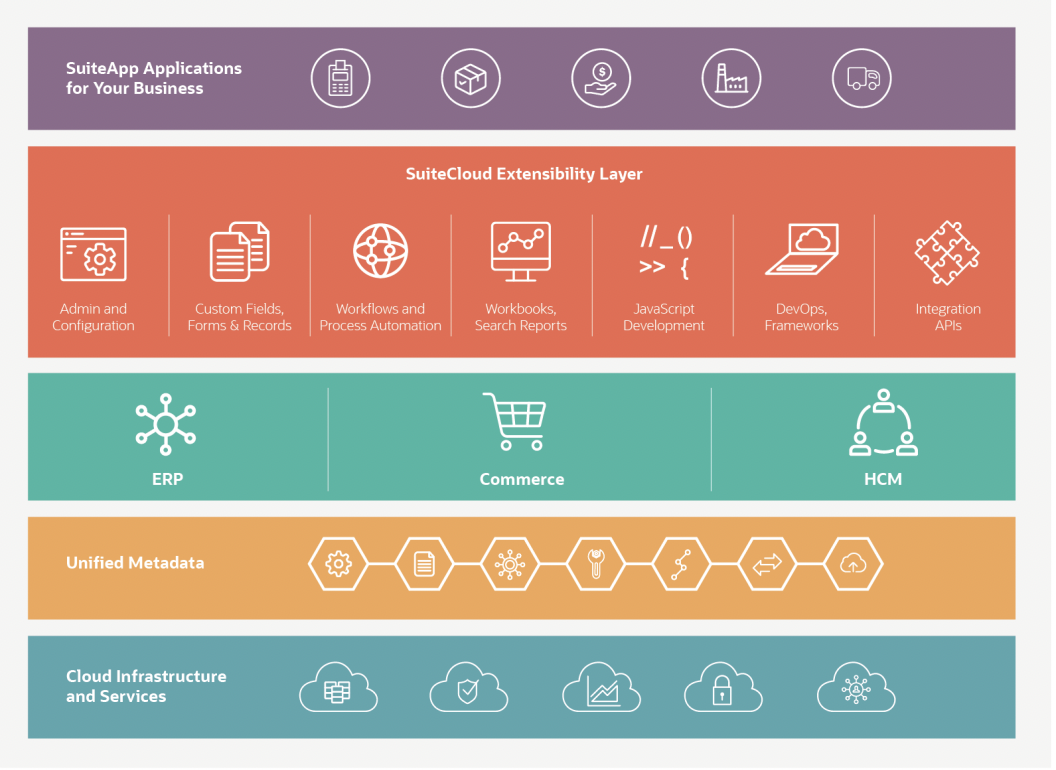
Here is a visualization of the platform. As you can see, the platform includes a lot more than just the features we discussed in the modules section. For more information on the SuiteCloud platform, I recommend you check out this page as well as this datasheet. For now let’s discuss some of the most important features of the SuiteCloud platform.
Oracle NetSuite Analytics
NetSuite Analytics is a feature of the NetSuite SuiteCloud platform that allows users to create custom reports and dashboards to track key performance indicators (KPIs) and make data-driven decisions. With NetSuite Analytics, you can access real-time data from across your business, including financial data, sales data, customer data, and operational data.
Some of the main features of NetSuite Analytics include:
- Custom reports: You can create custom reports to display data in a variety of formats, including tables, charts, and graphs. You can also schedule reports to be automatically generated and delivered to specific users on a regular basis.
- Dashboards: You can create custom dashboards to display real-time data in a visual format, such as charts, graphs, and gauges. Dashboards can help you quickly and easily track key performance indicators and make data-driven decisions.
- Data visualization: NetSuite Analytics includes a range of visualization options, including pie charts, bar charts, line graphs, and more. You can use these visualizations to make data more meaningful and easier to understand.
- Data filtering and sorting: You can filter and sort data in NetSuite Analytics to focus on specific sets of data or to find specific information.
- Collaboration: You can share reports and dashboards with other users, and collaborate on data analysis in real-time.
Workflow Automation (SuiteFlow)
SuiteFlow is a visual, drag-and-drop tool that allows non-technical users to build logic. You can create rules such as “If a customer is on Credit Hold, automatically block the Sales Order and email the CFO.” It empowers business analysts to automate standard operating procedures without writing code.
API and Integration Layer
NetSuite is an “Open” system. Through its robust API layer (SuiteTalk), it can connect to virtually any other modern software. This allows NetSuite to serve as the “Hub,” connecting “Spokes” like Shopify, Salesforce, Slate, or WMS systems.
Administrator Tools and Configuration
The platform provides granular control over security.
Roles & Permissions: You can define exactly what every user can see and do down to the field level.
Auditing: Every login, script execution, and transaction change is logged.
CSV Import: Powerful tools for mass-updating data and migrating legacy records.
JavaScript Development Tools (SuiteScript)
For complex logic, developers use SuiteScript, a standard JavaScript-based language. It allows for “Server-Side” logic (running complex math on the server) and “Client-Side” logic (validating data as a user types into a form).
Custom Fields and Form Builders (SuiteBuilder)
SuiteBuilder allows you to modify the database structure. You can add “Custom Fields” (e.g., a “Customer Loyalty Score” field) or “Custom Records” (tables unique to your business) with point-and-click simplicity.
How to Buy NetSuite
NetSuite is not sold off the shelf; it is a negotiated contract. You can buy “Direct” (from Oracle sales reps) or through “Solution Providers” (Partners who sell the license and implement).
NetSuite Licensing and Pricing
Pricing is opaque and highly variable. It is constructed based on a “User + Module + Tier” formula. There is no single price list, but understanding the components gives you leverage.
User-Based Pricing
You pay an annual subscription fee for every user who logs in. However, not all users are equal:
Full User: Expensive. Access to everything (CRM, ERP, Reports). Required for Controllers, Sales Managers, and Admins.
Employee Center User: Inexpensive (approx. 1/5th the cost). Restricted to entering time, expenses, and approving POs.
Planning Strategy: Identifying your “User Mix” early is the easiest way to lower your recurring license cost.
Editions
NetSuite packages core modules into “Editions” (e.g., Limited Edition, Mid-Market Edition, Enterprise Edition). These are often bundled with industry-specific capabilities (like the “Manufacturing Edition” or “Wholesale Distribution Edition”) which include pre-configured roles and dashboards.
Add-on Modules
This is the “A La Carte” menu. If you need OneWorld, Advanced Inventory, or Fixed Assets, these are added as separate line items. Beware of “Shelfware”—do not buy advanced modules in Year 1 if you won’t be ready to implement them until Year 2.
Service Tiers
Often overlooked, the Service Tier dictates your infrastructure limits (file storage size and monthly transaction lines). High-volume businesses (like B2C e-commerce) may need to upgrade to a “Premium” or “Enterprise” tier not because they have many users, but because they process millions of transaction lines.
NetSuite Partners
As you could imagine, a platform like NetSuite has attracted quite the community around it. A number of businesses have stepped up to provide additional services and software that benefit NetSuite users. NetSuite has arranged it’s ecosystem of partners in into these categories:
- Solution providers: Solution Providers are companies that sell NetSuite software and solutions to their customers. They may also provide implementation and customization services.
- Alliance Partners: Service providers are companies that offer professional services, such as consulting, implementation, training, and support, to help customers get the most out of their NetSuite software.
- SuiteCloud Development Network (SDN): SDN partners are companies that have developed integrations or customizations that enhance the functionality of NetSuite. These partners may be software vendors, hardware manufacturers, or other technology companies.
- OEM partners: OEM (Original Equipment Manufacturer) partners are companies that incorporate NetSuite functionality into their own products or services.
- Independent software vendors (ISVs): ISVs are companies that develop software applications that run on top of NetSuite. These applications may provide specialized functionality or integrate with other systems.
- Referral partners: Referral partners are companies that refer potential customers to NetSuite. They may receive a commission for successful referrals.
NetSuite Implementation
Buying the software is easy; installing it is hard. A NetSuite implementation is a rigorous process of mapping your business processes to the software. A “Bad Implementation” creates technical debt that can cripple a company for years.
SuiteSuccess vs. Standard Implementation
SuiteSuccess: Oracle’s “stairway” methodology. It deploys a pre-configured account with industry best practices already built in.
Pros: Faster (100 days), cheaper, lower risk.
Cons: Rigid. You must adapt your process to the software.
Standard (Traditional): A blank slate approach.
Pros: The system is molded to fit your exact unique requirements.
Cons: Long (6-12 months), expensive, high risk of scope creep.
NetSuite Implementation Process
A healthy project follows five distinct phases:
Discovery: Defining the Business Requirement Document (BRD).
Configuration: Setting up the environment and workflows.
Data Migration: Cleaning and importing master records (Customers, Vendors, Items).
Testing (UAT): User Acceptance Testing where your team validates the system.
Go-Live & Hypercare: The launch and immediate post-launch support.
For more information on this topic, check out our NetSuite Implementation Guide.
NetSuite Customization/Development
The philosophy of NetSuite is “Configure before you Customize.” However, when you need to customize, the tools are robust.
SuiteBuilder / SuiteFlow / SuiteScript
SuiteBuilder: The “Click” layer. Used for adding fields and changing form layouts. Always start here.
SuiteFlow: The “Logic” layer. Used for approvals and automation. Use this for standard business rules.
SuiteScript: The “Code” layer. Used for complex integrations and calculations. Use sparingly, as code requires maintenance.
SuiteApps and Third-Party Applications
Before building a custom solution, check the SuiteApp Marketplace. Thousands of developers have built “Native” applications that install inside NetSuite. Whether you need a specific dunning tool, a bank connector, or a shipping integration, there is likely a “Built for NetSuite” (BFN) app that solves the problem cheaper than custom development.
NetSuite Integration
In the modern enterprise, ERP does not live on an island. It must connect to CRMs, WMS, and E-commerce platforms.
SOAP (SuiteTalk) vs. REST (Restlets)
This is a critical technical distinction.
SOAP (Simple Object Access Protocol): The older, XML-based standard. Crucial Note: NetSuite is moving away from SOAP.
REST (Representational State Transfer): The modern, JSON-based standard. It is faster, lighter, and more secure.
The 2026 Shift: Be aware of upcoming deprecations regarding SOAP endpoints. All new integrations should be architected using RESTlets to ensure future-proofing.
Native vs. Middleware vs. Connectors
Native Connectors: Pre-built links (e.g., the NetSuite Connector for Shopify). Good for simple needs.
iPaaS (Middleware): Platforms like Celigo or Boomi. These act as a “Universal Translator” between NetSuite and other apps. They are best for complex, high-volume ecosystems.
Point-to-Point Connectors: Pre-built single point integrations. Generally discouraged as they are fragile and hard to maintain, and can be outgrown easily.
For more information on this topic, check out our Complete NetSuite Integration Guide.
NetSuite Administration
The NetSuite Administrator is the most important hire you will make. This role is often underestimated as “IT Support,” but they are actually the “Gatekeeper of the Data.”
Value: An Admin manages users, ensures security, builds reports, and maintains the health of the system.
Risk: Without a dedicated Admin, the system inevitably degrades into a mess of bad data and broken workflows.
For more information on this topic, check out our NetSuite Administrator Guide.
NetSuite Training
Training is the primary driver of ROI. If users do not know how to use the system, they will revert to spreadsheets, rendering your investment useless.
Partner vs. NetSuite Direct Training
NetSuite Direct (LCS): “Learning Cloud Support” is a subscription to Oracle’s video library. It is excellent for generic, foundational knowledge.
Partner Training: This is customized to your instance. A partner will train your team on your specific workflows, using your data. This context is usually more effective for end-user adoption.
NetSuite Support
When it comes to getting support for NetSuite. There are currently 4 options:
- Basic Support: NetSuite basic support is included with all subscriptions. It includes access to online resources, such as documentation, FAQs, and knowledge base articles, a Support Community Group, as well as phone support for users who need immediate assistance.
- Premium Support: NetSuite Premium Support is similar to basic, however, it offers priority queueing, weekend support, upgrade notices, and Commerce support.
- Advanced Consumer Report (ACS): NetSuite Advanced Customer Support (ACS) is a premium support offering from NetSuite that provides users with additional resources and support options to help them get the most out of the software and resolve any issues they may have. Some of the features of NetSuite ACS include:
- Priority phone support: ACS users have priority access to phone support, allowing them to receive faster assistance for any issues or questions they may have.
- Dedicated account management: ACS users are assigned a dedicated account manager who is available to help them optimize their use of the software and address any issues or concerns.
- Specialized resources: ACS users have access to specialized resources, such as technical account managers, to help them with more advanced issues or specific business needs.
- Customized training: ACS users can receive customized training to help them get the most out of the software and achieve their business objectives.
- Partner Support: You can also choose to go with a NetSuite partner if you would like a specific type of support. There are plenty of NetSuite partners that offer all kinds of options.
Resources
Here are some resources that may be helpful for users or potential users of NetSuite:
- NetSuite website: The NetSuite website provides information about the company and its products, including product descriptions, pricing, and case studies. https://www.netsuite.com/
- NetSuite documentation: The NetSuite documentation provides detailed information about how to use the various features and functions of the software. https://docs.netsuite.com/
- NetSuite support: NetSuite offers a range of support options, including online resources, phone support, and community forums. https://www.netsuite.com/portal/support.shtml
- NetSuite training: NetSuite offers various training options, including online courses and instructor-led training, to help users learn how to use the software effectively. https://www.netsuite.com/portal/education.shtml
- NetSuite blogs: The NetSuite blog provides articles and resources on a variety of topics, including best practices, industry insights, and product updates. https://www.netsuite.com/blog/
- NetSuite user groups: There are a number of user groups and communities where NetSuite users can connect with each other and share knowledge and experiences. https://www.netsuite.com/portal/community/user-groups.shtml
- Unofficial User Group: Here is a user group that is not officially tied to NetSuite. This group is helpful for users who are looking for information that is less biased towards partners and the NetSuite company itself. https://www.reddit.com/r/Netsuite/
NetSuite FAQ
What is NetSuite Used For?
NetSuite is a cloud-based business management software that helps organizations manage their financials, operations, and customer relationships. It offers features such as accounting, CRM, inventory management, e-commerce, and more, all in one platform. NetSuite can be used by businesses of all sizes, from small startups to large enterprises, to streamline their processes and improve efficiency.
Is NetSuite the same as Oracle?
NetSuite is owned by Oracle, but it operates as a separate business unit within the company. NetSuite was acquired by Oracle in 2016 and since then has continued to operate independently, providing cloud-based ERP and CRM solutions to its customers.
Is NetSuite easy to learn?
NetSuite can be challenging to learn, especially for users who are not familiar with cloud-based ERP systems. However, NetSuite offers training and certification programs to help users develop the skills and knowledge necessary to effectively use the software. Additionally, NetSuite’s user-friendly interface and customization options make it easier for users to adapt the platform to their specific needs.
What problems does NetSuite solve?
NetSuite solves many common business problems such as inefficient processes, lack of visibility into financial and operational data, and the need to consolidate multiple software systems. With NetSuite, organizations can streamline their operations, improve efficiency, and gain real-time visibility into their data to make better-informed business decisions.
Who are some NetSuite Competitors?
Some of NetSuite’s main competitors include SAP Business One, Microsoft Dynamics 365, Salesforce, Acumatica, and Epicor ERP. These platforms offer similar features such as CRM, accounting, and inventory management, but each has its own unique strengths and weaknesses, making it essential for organizations to carefully evaluate their options before selecting a platform.
Is NetSuite an ERP or CRM?
NetSuite is both. It is primarily an ERP (Enterprise Resource Planning) system, but it includes a fully integrated CRM (Customer Relationship Management) module within the same database, ensuring sales and finance share a single source of truth.
Does NetSuite work for small businesses?
Yes, but usually for “scaling” small businesses. NetSuite is generally recommended for companies with at least $3M-$5M in annual revenue or complex operational needs (like inventory or multi-currency) that cheaper software cannot handle.
How often does NetSuite update?
NetSuite automatically upgrades all customers twice a year (typically “Release 1” in Spring and “Release 2” in Fall). These updates are mandatory and ensure all users are on the latest version of the platform.
Closing Thoughts
NetSuite is more than just accounting software; it is an operating system for your business. Its “True Cloud” architecture, modular flexibility, and massive partner ecosystem make it the gold standard for mid-market growth. However, its power comes with complexity. Success requires a clear understanding of the licensing model, a disciplined implementation strategy, and a commitment to ongoing administration. By respecting the architecture and investing in the ecosystem, you can build a platform that scales with you for decades.
