
The Complete NetSuite Implementation Guide 2026: Steps, Costs, & Risk Mitigation
Implementing an ERP system is widely considered the open-heart surgery of the business world. It is vital, transformative, and necessitates absolute precision. For mid-market companies graduating from QuickBooks, Sage, or legacy on-premise systems, moving to Oracle NetSuite is not just a software install—it is a fundamental restructuring of your operational DNA.
The stakes are incredibly high. A successful implementation unlocks real-time visibility, automates drudgery, and scales with your revenue. A failed one can bleed budget, freeze operations, and cost executives their jobs.
This guide is written to move you beyond the sales brochures. We will dissect the technical realities, the “unwritten rules” of partner selection, and the specific methodology required to bring a NetSuite project to a successful Go-Live.
For more information on NetSuite in general check out our Ultimate NetSuite Guide.What is NetSuite Implementation?
NetSuite Implementation is the systematic process of configuring, migrating data to, and deploying the Oracle NetSuite ERP platform. It is a multi-disciplinary project that replaces legacy accounting and inventory systems with a unified cloud environment. The process involves distinct phases including discovery, system architecture, data migration, scripting, user acceptance testing (UAT), and end-user training.
Unlike installing a simple SaaS app like Slack or Zoom, NetSuite requires a tailored architecture. The software is a blank canvas; “Implementation” is the art of painting your specific business logic onto that canvas so the system behaves exactly how your finance and operations teams need it to.
The “Things I Wish I Knew” Before Starting
Everyone tells you NetSuite is powerful, but few tell you how painful the transition can be if you aren’t prepared for the “unwritten rules” of the ecosystem.
1. The “Blueprint” is Scripture—Read it. In the sales process, you will discuss many features. However, once you sign the Statement of Work (SOW), the BRD becomes law. If a feature isn’t explicitly written in that document, it does not exist in the project scope. The Trap: Assuming “standard” features are included automatically.
2. You Cannot “Part-Time” the Project Manager Role One of the most common causes of failure is assigning the “Project Lead” role to a Controller who already has a 40-hour work week. A NetSuite implementation is a full-time job. If your internal lead is distracted by month-end close, the implementation will stall.
3. The “Sales to Service” Handoff is Leaky The team that sells you the software is rarely the team that implements it. Sales reps are incentivized to close deals; Implementation consultants are incentivized to finish hours. Record your demo sessions and re-state your critical requirements clearly at the kickoff.
4. The “Part-Time Admin” Fallacy Many companies believe they can launch NetSuite without a dedicated Administrator. This is false economy. NetSuite is a living organism that requires daily feeding (workflow tweaks, user management, report building). If you don’t hire an Admin, your expensive ERP will stagnate.
For more on this check out our full NetSuite Implementation Lessons Guide.
The 7 Core Stages of NetSuite Implementation
While every business is unique, the methodology for success is standardized. Whether you utilize the “SuiteSuccess” agile method or a traditional “Waterfall” approach, these seven phases are non-negotiable.
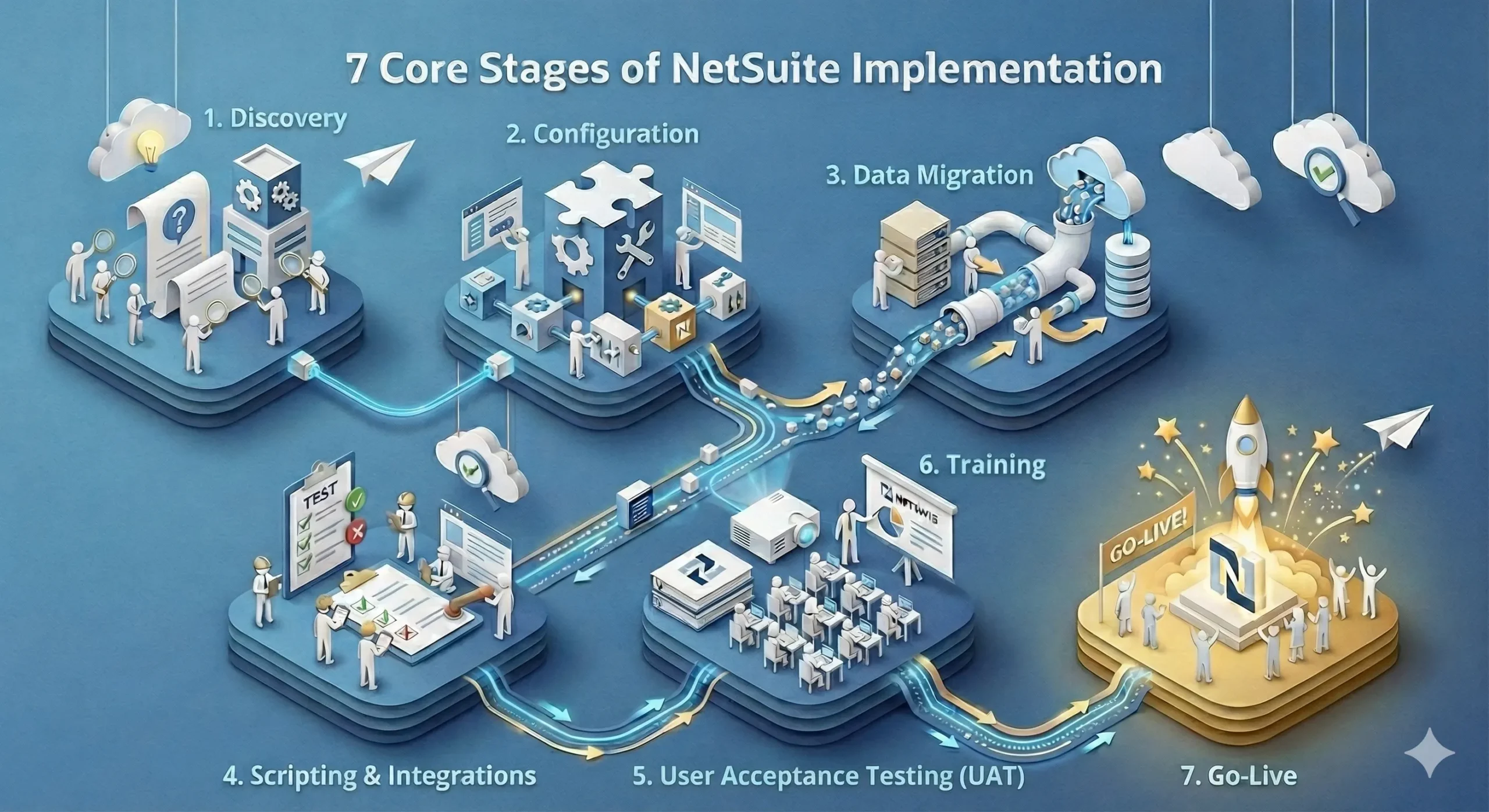
Phase 1: Discovery & BRD Creation
This is the foundation of the entire project. Before a single setting is changed, your implementation team must understand how you do business.
-
The Goal: Translate your workflows into a Business Requirements Document (BRD).
-
The Deliverable: The BRD serves as the “blueprint” for the build. It details every gap between standard NetSuite functionality and your needs.
-
Critical Note: If a requirement is not written in the BRD, it does not exist in the scope. Do not assume “standard” features (like specific dunning letters or niche inventory reports) are included unless documented here.
Phase 2: System Configuration & MVP Build
Once the BRD is signed, the “Build” phase begins. Consultants configure the core settings: enabling features, setting up the Chart of Accounts (CoA), and defining user roles.
-
The Strategy: Focus on a Minimum Viable Product (MVP). The goal is to get the system functional for your core business processes (Order-to-Cash, Procure-to-Pay) as quickly as possible.
-
Configuration vs. Customization: This phase prioritizes native configuration (checking boxes) over complex scripting (writing code) to keep the system upgrade-proof.
Phase 3: Data Migration Strategy
This is historically the primary cause of project delays. You must extract data from your legacy system, clean it, and map it to NetSuite’s rigid structure.
-
Master Data: This includes static records like Customers, Vendors, Items, and Chart of Accounts. This is mandatory and usually moved via CSV import.
-
Transactional Data: This is the history—Sales Orders, Invoices, Bills.
-
The Strategy: Do not migrate historical transactions. Instead, migrate “Open Balances” (what is currently owed to you or by you) and keep your legacy system active with a “Read-Only” license for historical lookup. This saves tens of thousands of dollars and weeks of cleaning time.
Phase 4: Scripting & Integrations
NetSuite rarely lives in a vacuum. It must talk to your other critical systems, such as Salesforce (CRM), Shopify/Amazon (eCommerce), or 3PL warehouses.
-
Integration: Middleware tools like Celigo or Boomi are often used to build connectors between NetSuite and external platforms.
-
Scripting: If native NetSuite cannot handle a specific logic (e.g., “If customer buys X, automatically add free sample Y to the cart”), developers use SuiteScript to build this custom behavior.
Phase 5: User Acceptance Testing (UAT)
This is the “make or break” phase. UAT is not a demo; it is a stress test performed by your team, not the consultants.
-
The Process: Users must execute “Day in the Life” scripts—processing real orders, receiving real inventory, and running real billing cycles in the Sandbox environment.
-
The Outcome: UAT exposes bugs and process gaps. You cannot proceed to Go-Live until the “UAT Scorecard” shows a critical mass of passed tests.
Phase 6: Training & Change Management
The best system in the world will fail if your team hates using it. Training should be role-based, not generic.
-
Role-Based Training: The Warehouse Manager needs a completely different curriculum than the Controller.
-
Train the Trainer: The most effective model is often training your internal “Power Users” who then train their respective departments. This builds internal ownership.
Phase 7: Go-Live & Cutover
The “Cutover” is the actual switch. It typically happens over a weekend to minimize disruption.
-
The Blackout Period: You will likely have a period of 2-4 days where no transactions can be entered in either the old or new system while balances are finalized and transferred.
-
Go-Live: On Monday morning, the URL is live, and the old system is locked.
NetSuite Direct vs. Partner vs. DIY: The 3 Implementation Models
You generally have three paths for implementation. While 90% of the market chooses between NetSuite Direct or a Partner, the “DIY” route exists for a very specific type of company.
1. NetSuite Professional Services (Direct)
This is the “Corporate” route. You hire Oracle NetSuite’s internal team. They use the SuiteSuccess methodology, which is rigid and standardized. It is excellent if you want to fit your business into NetSuite’s “leading practices,” but can feel impersonal if you need creative consulting.
2. Solution Partners (Agencies)
These are private consulting firms certified by NetSuite. They tend to be more flexible, relationship-driven, and willing to build complex customizations. They are often the best choice for companies with unique workflows that don’t fit the standard box.
3. Self-Implementation (DIY)
Warning: This is the highest-risk path. In this model, you buy the license and attempt to configure the system using only your internal IT/Finance staff.
-
Who is this for? This only works if you have hired a Senior NetSuite Architect (salary range $140k – $180k+) to work in-house full-time.
-
The Risk: Without a certified expert, you will likely make “irreversible” architectural errors (like incorrect subsidiary structures) that require an expensive “Rescue Project” later.
Feature NetSuite Direct (Pro Services) Solution Partner (Agency) Self-Implementation (DIY) Methodology Rigid, standardized (SuiteSuccess). Best for “vanilla” processes. Flexible, consultative. Best for complex needs. Ad-hoc / Internal. High risk of scope creep. Team Consistency High turnover; resources may change mid-project. Dedicated team; you know your consultants by name. Internal staff (often distracted by day jobs). Expertise Deep product knowledge, but generalist industry knowledge. Specialized industry expertise (e.g., Manufacturing, SaaS). Limited to internal team’s prior experience. Cost Profile Lower service fees, but rigid on license discounts. Higher service fees, but better license negotiation. “Free” initially -> Very High long-term (Rescue Costs). Success Rate High (if sticking to standard). High (if partner is vetted). Low (high failure rate).
The “Hybrid” Co-Managed Option
There is a fourth, lesser-known path: The Co-Managed Implementation. In this model, you hire a Partner for high-level architecture and complex scripting, but your internal IT or Finance team handles the “grunt work” (CSV data imports, simple form customization, and saved searches).
-
The Benefit: This can reduce service fees by 30-40% and ensures your internal team is intimately familiar with the system backend by the time you go live.
How to Choose a NetSuite Implementation Partner
Your choice of partner is more important than the software itself. A mediocre software implemented by an expert team will outperform the best software implemented by a novice team. Check out our full NetSuite Implementation Partner Checklist for more info.
The Partner Vetting Checklist:
-
[ ] The “Bait and Switch” Check: During the sales cycle, ask to meet the actual consultants who will be logging hours on your project, not just the Sales Architect.
-
[ ] Vertical Certification: Do not ask “Have you done NetSuite?” Ask “Have you implemented NetSuite for a [Your Industry] company with [Your Revenue]?” A manufacturing expert may fail at a SaaS implementation.
-
[ ] Rescue Revenue: Ask what percentage of their business comes from “Rescue Projects” (taking over failed implementations). Partners who do high-volume rescues are often the most technically competent.
-
[ ] Change Management Philosophy: If they only talk about software and not about people/training, run.
How Much Does NetSuite Implementation Cost?
Determining the exact cost of a NetSuite implementation without a full discovery process is like pricing a house without seeing the blueprints. However, for a typical mid-market organization, implementation fees generally range between $25,000 and $100,000, with complex enterprise projects frequently exceeding this.
A helpful heuristic for budgeting is the 2x-3x Rule: You should expect your one-time implementation fees to be roughly 2 to 3 times your annual software license cost. For more info check out a more complete break down of NetSuite Implementation Costs.
The 4 Main Cost Drivers
1. Data Migration
Migration costs are dictated by the cleanliness of your legacy data and the method of transfer.
-
The Cost: Small businesses needing simple “flat file” transfers (CSV imports) can expect to pay $1,000 – $2,500. Enterprise organizations requiring automated ETL (Extract, Transform, Load) tools or historical data cleansing should budget $10,000+.
-
The Strategy: To save money, limit migration to “Master Data” (customers, items, vendors) and “Open Balances.” Migrating historical transactional data is the fastest way to blow your budget.
2. Customization & Development
While NetSuite is highly configurable, specific functional gaps may require SuiteScript code.
-
The Cost: Certified NetSuite Developers typically charge between $140 – $200 per hour. A typical mid-market project might require $10,000 to $60,000 in development fees depending on how many gaps need closing.
-
The Strategy: Challenge every customization request. Ask: Can we adapt our process to fit NetSuite’s standard workflow instead of paying to change the software?
3. Integrations
NetSuite creates the most value when connected to your CRM (Salesforce), eCommerce (Shopify/Magento), or 3PL.
-
The Cost:
-
Simple Connectors: Pre-built “point-to-point” connectors generally cost around $3,600 per year.
-
Integration Platforms (iPaaS): For complex, multi-endpoint data flows (e.g., Celigo, Boomi), license fees range from $12,000 – $48,000 per year.
-
Setup: Don’t forget the one-time implementation fee for the integration itself, which ranges from $1,000 to $12,000.
-
4. Training
Training is often the first item cut from a budget, but it has the highest correlation with long-term ROI.
-
The Cost: NetSuite offers “Learning Cloud Support” passes, and many partners offer fixed-bid training packages.
-
The Strategy: Negotiate training into your initial software purchase. At a minimum, ensure your internal Administrator takes the NetSuite Essentials course. We also recommend an annual training budget to upskill staff on new semi-annual release features.
| Expense Category | Low End Est. | High End Est. | Recurring? |
|---|---|---|---|
| Data Migration | $1,000 | $10,000+ | No (One-time) |
| Development ($140-$200/hr) | $10,000 | $60,000+ | No (One-time) |
| Integration (Tool) | $3,600 / yr | $48,000 / yr | Yes |
| Integration (Setup) | $1,000 | $12,000 | No (One-time) |
| Total Project Range | $25,000 | $100,000+ | – |
How Long Does a NetSuite Implementation Take?
The industry standard answer for a typical mid-market company is 90 to 150 days. However, “time” in ERP projects is a function of complexity, not just company size. A 50-user service company might launch in 3 months, while a 10-user manufacturing plant with complex BOMs could take 6 months.
We generally categorize implementation timelines into three distinct tiers:
1. The “Fast Track” (Simple)
-
Timeline: 30 – 90 Days
-
Profile: Single entity, single currency, English only.
-
Scope: You fit into the “SuiteSuccess” box. You are using NetSuite’s pre-configured workflows (standard Invoice-to-Cash, Procure-to-Pay) with zero to minimal customization.
-
Data: Opening balances only. No historical transaction migration.
2. The Standard Mid-Market (Normal)
-
Timeline: 4 – 6 Months
-
Profile: Single or Multiple entities (within one country).
-
Scope: You have specific gaps requiring configuration. You likely have 1-2 critical integrations (e.g., Salesforce or Shopify) and need specific financial reporting adjustments.
-
Data: Cleaning master data takes significant time here.
3. The Enterprise Build (Complex)
-
Timeline: 6 – 9+ Months
-
Profile: Global operations (OneWorld), multiple currencies, multiple tax nexuses.
-
Scope: Heavy customization. You are rewriting NetSuite logic to fit a unique business model. Requires complex middleware (Celigo/Boomi) for a “best-of-breed” tech stack.
-
Data: Massive data transformation efforts required across subsidiaries.
What Actually Adds to the Timeline? (The “Velocity Killers”)
Most delays are not caused by the software, but by internal bottlenecks. If you want to stay on the “3-month” side rather than the “6-month” side, watch out for these drag factors:
-
Dirty Data: If your legacy data is messy (duplicates, bad formatting), migration will stall. Rule of thumb: It takes 2x longer to clean data than you think.
-
Resource Availability: The #1 cause of delay is the client team (you) not responding to questions because of “day job” distractions.
-
The “Customization Trap”: Every custom script you request adds development, testing, and debugging time. Stick to standard functionality wherever possible.
-
Integrations: Connecting third-party tools (3PLs, Banks, eCommerce) always involves waiting on other vendors’ APIs.
| Tier | Avg. Timeline | Typical Profile |
|---|---|---|
| Simple (SuiteSuccess) | 30 – 90 Days | Single Entity. No custom code. Standard workflows. < 10 Users. |
| Normal (Mid-Market) | 4 – 6 Months | 1-3 Entities. 1-2 Integrations (CRM/Bank). Minor Gaps. 10-100 Users. |
| Complex (Enterprise) | 6 – 9+ Months | Global (OneWorld). Heavy Integration. Custom scripting. 100+ Users. |
Why Implementations Fail (and How to Recover)
Gartner estimates that 55% to 75% of ERP projects fail to meet their original objectives. Why?
The “Historical Data” Trap
There is a strong urge to migrate 7 years of historical GL data so you can run year-over-year reports immediately.
-
The Reality: Migrating historical transactions is expensive, messy, and prone to breaking. NetSuite’s data structure likely differs from your legacy system.
-
The Fix: Migrate “Master Data” and “Open Balances” only. Keep your legacy system active with a “read-only” license for historical analysis.
Scope Creep vs. Phased Rollout
Stakeholders often want the “Dream System” on Day 1.
-
The Reality: Trying to launch Financials, CRM, Inventory, and eCommerce simultaneously is a recipe for disaster.
-
The Fix: Adopt a “Land and Expand” strategy. Go live with Financials and Inventory first (Phase 1). Stabilize. Then roll out CRM (Phase 2).
Lack of Owner or Executive Buy-In
If the CEO/CFO views this as “an IT project” rather than a “Company Project,” it will fail. Implementation requires forcing different departments to agree on standardized processes. Without Executive enforcement, departments will cling to their old, inefficient ways of working.
To learn more, check out our Why NetSuite Implementations Fail Guide.
Beyond Go-Live: Hypercare & Managed Services
Go-Live is not the finish line; it is the starting line.
What is Hypercare? Hypercare, sometimes refered to as post-go-live-support, is the immediate 30-day period following Go-Live. During this time, your partner should provide elevated support levels to catch critical bugs or user errors immediately. Do not sign a contract that ends support the day of launch.
Managed Services: After Hypercare, you transition to “Managed Services.” This is an ongoing retainer where you pay for a bucket of hours monthly for optimization, new reports, and troubleshooting. This is vital for the first year as your team learns the system.
Conclusion: The “Go-Live” Is Just the Starting Line
Implementing NetSuite is likely one of the most significant capital projects your company will undertake this decade. It is not merely an IT upgrade; it is a fundamental restructuring of your operational DNA.
The difference between a horror story and a success story rarely comes down to the software itself—NetSuite works. The difference lies in the discipline of your preparation. Companies that treat implementation as a “side project” for their Controller fail. Companies that dedicate real resources, clean their data ruthlessly, and respect the complexity of the process win.
As you move forward, remember that “Go-Live” is not the finish line—it is simply the day you start using your new tool to build a better business. The real ROI comes in the months that follow, as you automate the drudgery and gain the visibility needed to scale.
Your Final Checklist:
-
Don’t rush the Discovery phase. If it isn’t in the BRD, it won’t be in the system.
-
Hire for the gaps. If you don’t have an internal NetSuite expert, you must rely on a partner who does.
-
Respect the data. Garbage in, garbage out.
The path to a cloud ERP is steep, but the view from the top—real-time inventory, automated financials, and a scalable platform—is worth the climb.
If you are struggling with your own NetSuite implementation or currently considering undergoing one, you can check out our NetSuite Implementation Services.Frequently Asked Questions
Q: Can I implement NetSuite myself (DIY)?
A: No. Unless you have a certified senior NetSuite Architect on your internal payroll, DIY is a guaranteed failure. NetSuite is not “plug and play” like QuickBooks; the backend architecture requires specialized certification to configure correctly.
Q: What is the biggest risk in NetSuite implementation?
A: Poor Data Quality. If you import “dirty” data (duplicates, wrong addresses, bad item codes) into NetSuite, the system will generate bad reports. The adage “Garbage In, Garbage Out” applies strictly here.
Q: Who Implements NetSuite?
A: NetSuite is implemented by three groups:
-
NetSuite Professional Services: Oracle’s direct internal team.
-
Solution Partners: Certified external agencies (often boutique firms).
-
Independent Contractors: Freelance architects (best for support, risky for full implementation).
Q: What is “SuiteSuccess”?
A: SuiteSuccess is NetSuite’s “out-of-the-box” implementation methodology. It comes pre-configured with industry-specific dashboards, roles, and KPIs (e.g., a “Manufacturing” edition or a “Software” edition) to speed up implementation time by attempting to fit your business into their best practices, rather than building from scratch.
Q: What is the difference between an implementation and an optimization?
A: Implementation is the initial setup to get you from zero to Go-Live. Optimization happens months or years later, where you revisit the system to turn on advanced features, automate workflows, or fix processes that were set up incorrectly during the initial rush.
Q: Can I migrate everything from QuickBooks to NetSuite?
A: Technically, yes, but strategically, no. You should not attempt to migrate historical transaction details (e.g., every individual invoice from 2018) from QuickBooks. NetSuite’s data structure is fundamentally different, and forcing legacy data into it results in “messy” reporting.
-
Best Practice: Migrate “Master Data” (Customers, Vendors, Items) and “Open Balances” only. Keep a read-only license of QuickBooks for 7 years to satisfy audit requirements.
Q: Do I really need a full-time NetSuite Administrator?
A: If you have over 15 users, yes. A common failure mode is assigning “NetSuite Admin” duties to a Controller or IT Director who already has a full-time job. NetSuite is a living ecosystem that requires daily maintenance (workflow updates, role management, saved search creation). Without a dedicated owner, the system will stagnate and ROI will plummet. For more info on this, check out our Dedicated NetSuite Admin Guide.
Q: What is the difference between a “Sandbox” and “Production”?
A:
-
Production: Your “live” account where real money and real inventory are moving.
-
Sandbox: A separate “safety” copy of your Production account used for testing.
-
Critical Note: Data only moves one way (Production -> Sandbox) during a “Refresh.” You cannot “push” a button to move data from Sandbox to Production; configurations must be bundled (via SuiteBundler or SDF) or manually recreated in Production after testing.
Q: When is the best time of year to Go-Live?
A: The beginning of your Fiscal Year is ideal for accounting simplicity, but it is often the busiest time for your finance team.
-
Alternative: Choose a “slow season” month (e.g., July for retailers, January for construction). It is better to launch mid-year with a relaxed team than at year-end with a stressed team.
Q: What happens if my implementation fails (NetSuite Rescue)?
A: If your partner is underdelivering or the system is broken, you initiate a “Rescue Project.” This involves pausing the current build, auditing the “Technical Debt” (bad scripts/setup), and bringing in a specialized “Rescue Partner” to re-architect the solution. Note: It is often cheaper to pause and fix than to push a broken system to Go-Live.
Q: Is my data safe during implementation?
A: Yes. NetSuite uses Oracle’s enterprise-grade security (AES 256-bit encryption). However, the human element is the risk. During implementation, limit “Administrator” access to only the Project Lead and the Consultants. Do not give “Full Access” to junior staff for testing; give them restricted roles to prevent accidental data deletion.
