- CALL : (+1) 407-499-0530
- Main Office : (+1) 407-499-0530
Home » User Guides » NetSuite » Integration Explained » Platforms and Tools
NetSuite Integration Platforms and Tools Explained: The 2026 Guide To Middleware, iPaaS, and Connectors
The moment you implement NetSuite, you solve one problem—centralizing your ERP—and create a new one: data isolation.
Your eCommerce platform (Shopify/BigCommerce), CRM (Salesforce/HubSpot), and WMS (RF-SMART) are now disconnected islands. To bridge them, many CIOs and Operations Directors default to the cheapest available connector, only to find themselves six months later drowning in “spaghetti architecture”—a fragile web of unmonitored point solutions that break under peak volume.
This guide is not a feature list. It is a decision framework for choosing the right NetSuite integration tools to get the job done the right way. We will evaluate the three core models (Native Connectors, Third-Party Connectors, and Enterprise iPaaS) and provide a deep dive into the leading NetSuite integration platforms: NetSuite Connector (FarApp), Celigo, Boomi, MuleSoft, Workato, and Jitterbit.
Check out our guide here for more information on NetSuite Integration.
Table of Contents
ToggleWhat is a NetSuite Integration Platform?
A NetSuite Integration Platform is the middleware infrastructure that automates the flow of data between NetSuite (your system of record) and external applications.
Unlike a simple data import tool, a true integration platform manages bi-directional synchronization (e.g., a Sales Order in Shopify creates a Sales Order in NetSuite; the subsequent Fulfillment in NetSuite updates the Status in Shopify).
The market is divided into two distinct categories:
Point-to-Point Connectors: Tools designed to solve one specific connection (e.g., NetSuite to HubSpot).
iPaaS (Integration Platform as a Service): Centralized hubs that connect NetSuite to everything in your ecosystem through a single dashboard.
The 3 Core Integration Architectures
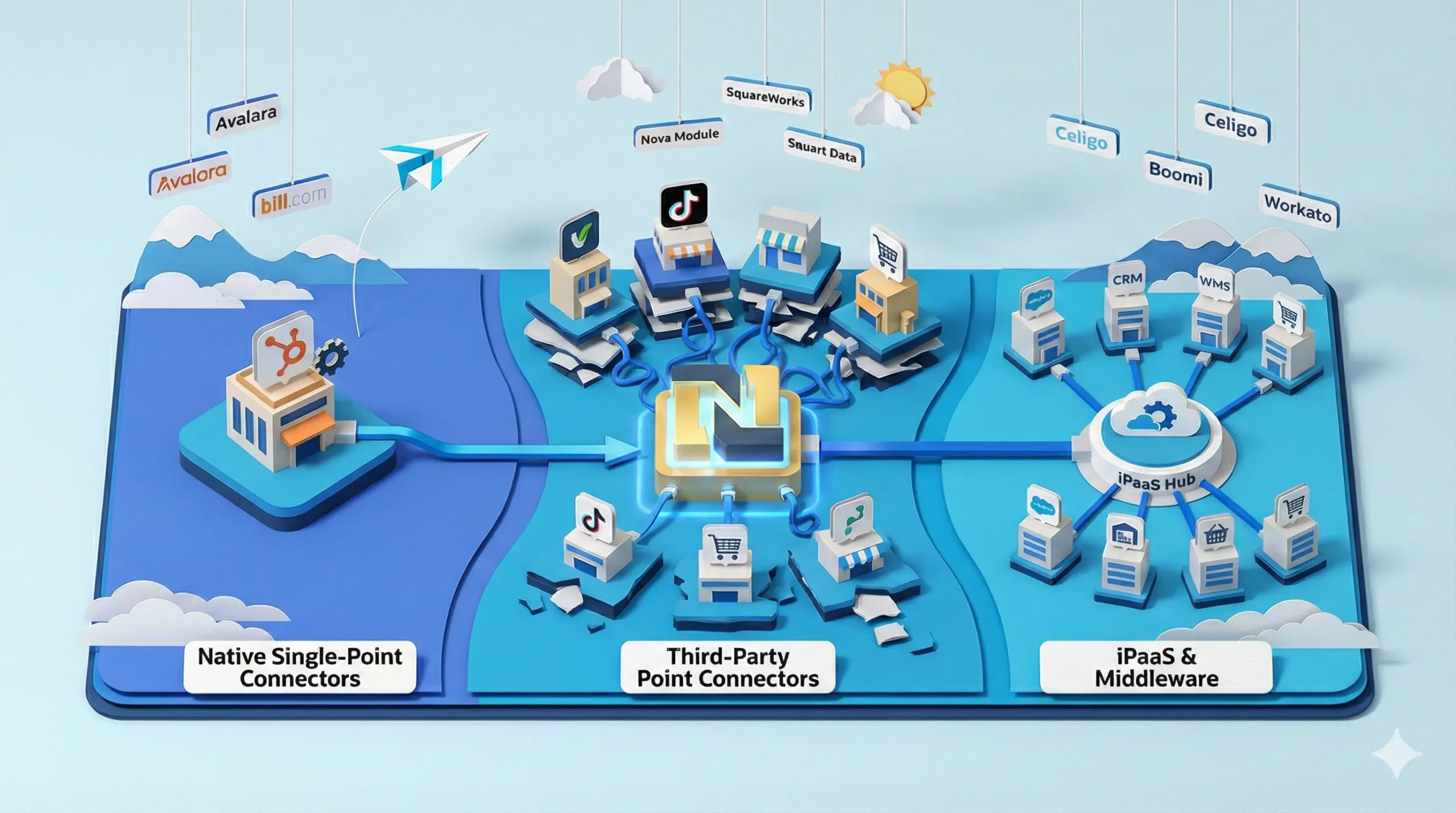
Before selecting a vendor, you must select an architecture. The biggest mistake companies make is mixing these architectures without a strategy, leading to conflicting data logic.
1. Native Single-Point Connectors (Vendor Managed)
These are direct integrations built and maintained by the external software vendor, not by Oracle NetSuite.
Examples: HubSpot Data Sync, RF-SMART, Avalara Avatax, Bill.com.
The Architecture: The external app “pushes” data into NetSuite using standard APIs.
The Reality: These are usually free or low-cost and ideal for “set it and forget it” standard fields. However, they are extremely rigid. If you need to map a custom HubSpot object to a custom NetSuite record, you are often out of luck because the vendor controls the roadmap.
2. Third-Party “Point” Connectors (Partner Managed)
These are niche NetSuite Integration tools built by independent NetSuite agencies or developer groups to solve one specific gap. Unlike major iPaaS players, these are often “Managed Bundles” designed for a single task.
Examples: Nova Module (TikTok Shop), SquareWorks (AP Automation), Various “Amazon Connectors” found on SuiteApp.com.
The Architecture: The “Wild West” of integrations. Quality varies drastically from “Enterprise Grade” to “One Developer in a Basement.”
The Reality: While excellent for deep niche expertise (e.g., handling TikTok Shop’s unique API quirks), stacking these leads to the Spaghetti Tax. If you buy one partner’s connector for Amazon, another for Shopify, and a third for your 3PL, you have three separate support teams to call when data breaks. You lack a centralized dashboard to view your enterprise health.
3. iPaaS & Middleware (Centralized Orchestration)
An Integration Platform as a Service (iPaaS) is a centralized hub that connects NetSuite to multiple endpoints (CRM, eCommerce, WMS) simultaneously. This is the enterprise standard for scalability.
Examples: Celigo, Boomi, Workato, Jitterbit, MuleSoft, NetSuite Connector (FarApp).
The Architecture: A Hub-and-Spoke model. The platform acts as a traffic controller, managing data flow, error handling, and logic between NetSuite and the rest of your stack.
Platform Deep Dives
We have analyzed the top platforms in the market. Each has a specific architectural philosophy that dictates who it is best for.
NetSuite Connector (formerly FarApp)
Category: Embedded Middleware / Managed Service Now owned by Oracle, this solution lives inside the NetSuite UI. It does not feel like external software; it feels like a tab in your ERP. It operates as a “Managed Bundle,” meaning the code is locked and maintained by Oracle. It is designed primarily to bridge NetSuite with major eCommerce marketplaces (Amazon, Walmart, eBay) and carts (Shopify, BigCommerce) without requiring you to leave the NetSuite environment.
Celigo (Integrator.io)
Category: NetSuite-Centric integration platform founded by early NetSuite employees, Celigo is widely considered the “Best of Breed” for this ecosystem. Its “Integration Apps” are pre-built, full-featured templates that cover 90% of use cases out of the box, allowing for rapid deployment without coding. It balances a user-friendly UI for business analysts with deep technical controls for developers.
Boomi
Category: Enterprise / Hybrid iPaaS Boomi uses a concept called “Atoms”—runtime engines that can be deployed anywhere (cloud or on-premise). This makes it a standard for connecting NetSuite to legacy on-premise systems like Mainframes, SQL Servers, or old warehouse databases that reside behind a corporate firewall. It is known for high-volume data processing and enterprise-grade security compliance.
MuleSoft (Anypoint Platform)
Category: API-Led Connectivity / Enterprise Owned by Salesforce, MuleSoft is the heavy hitter of the group. It treats every integration as an API. It is incredibly powerful but requires a team of developers fluent in “DataWeave” (their proprietary language) to manage. It is often used by global organizations to create a “composable enterprise” where every system (including NetSuite) becomes a reusable asset.
Workato
Category: Workflow Automation (BPA) Workato positions itself differently by focusing on “Recipes”—automated workflows that include human steps. It is less about “moving a million rows of data” and more about business logic: “If a deal closes in Salesforce > Slack the Manager > Wait for Approval > Create NetSuite Sales Order.” It empowers business users to build automations across apps like Slack, Teams, and Jira.
Jitterbit (Harmony)
Category: Legacy iPaaS Historically a strong competitor, Jitterbit is often seen in Salesforce-heavy ecosystems due to its “Harmony” product. While it offers a solid, reliable platform for connecting endpoints, its interface and innovation pace have lagged slightly behind the modern “low-code” feel of Celigo and Workato. It remains a workhorse for standard CRM-to-ERP integrations.
Pros & Cons
| Platform | Best For | Pros | Cons |
| NetSuite Connector (FarApp) | SMB & Retailers | Embedded Experience: Lives inside NetSuite; no new login to manage. Oracle Supported: Future-proofed against NetSuite updates. Retail Focus: Deep logic for Amazon/Shopify/Walmart. | The Black Box: You cannot see the code or raw error logs. Debugging often requires a support ticket. Rigid: Hard to use for non-standard apps (e.g., connecting a custom HR system). |
| Celigo | NetSuite-Centric Mid-Market | Usability: The most intuitive UI for NetSuite users. Templates: “Integration Apps” are robust and deployment-ready. Visibility: Excellent error management dashboard for non-technical users. | Cost Scaling: Can get expensive if you have many custom endpoints. API Limits: For massive enterprise volume, tuning concurrency requires expertise. |
| Boomi | Enterprise / Hybrid IT | Hybrid Power: “Atoms” allow secure on-premise connections. Scalability: Handles massive transaction volume without blinking. Flexibility: Can connect anything to anything. | Complexity: Dated UI; requires a trained engineer to manage. Learning Curve: Not for the “Citizen Integrator.” |
| MuleSoft | Global Enterprises | API Management: Best-in-class for managing internal APIs. Salesforce Native: Incredible synergy if you are a huge Salesforce shop. Power: Infinite customizability. | Cost: Often the most expensive option (Implementation + License). Technical Barrier: Requires Java/DataWeave developers; high maintenance overhead. |
| Workato | Automation Leaders | Automation: “Recipes” handle complex logic and human approvals. Modern UI: Very easy to use for business analysts. Community: Strong library of community-built recipes. | Pricing Model: Costs scale by “Recipe” (workflow), which can become unpredictable. Depth: Sometimes lacks the deep, nitty-gritty ETL power of Boomi/MuleSoft. |
| Jitterbit | Salesforce-Heavy Shops | Reliability: A proven, stable platform. Salesforce Sync: Strong historical performance for CRM syncs. | Innovation: UI feels older; fewer “pre-built” modern templates than Celigo. Speed: Development can be slower than low-code competitors. |
Which NetSuite Integration Tool Do You Need?
Use this logical flow to guide your budget allocation.
Scenario A: The Single-Channel Retailer
Profile: You have one Shopify store and NetSuite. You process <1,000 orders/month.
Recommendation: Native Vendor Connector or Low-Tier Third-Party Connector.
Why: You don’t have enough complexity to justify a full middleware license. A simple point-to-point link is sufficient.
Scenario B: The “All-In” NetSuite Shop
Profile: You want your team to live entirely inside NetSuite. You don’t want them logging into external portals to check errors. You have standard needs (Shopify, Amazon, eBay).
Recommendation: NetSuite Connector (FarApp).
Why: The Embedded Middleware approach keeps your operations simple. It handles multiple channels but keeps the UI familiar.
Scenario C: The Best-of-Breed Scale-Up
Profile: You use NetSuite, Salesforce (complex setup), Zendesk, Shopify Plus, and a 3PL.
Recommendation: Celigo or Workato (iPaaS).
Why: You need a “Control Tower” outside of NetSuite. When you have 5+ apps, you need a dedicated dashboard to visualize data health across the entire organization.
Scenario D: The Global Enterprise
Profile: You have on-premise SAP instances, legacy SQL databases, NetSuite, and a need for strict API governance.
Recommendation: MuleSoft or Boomi.
Why: You need “Heavy Metal” integration. The ability to deploy on-premise agents (Boomi Atoms) or manage complex internal APIs (MuleSoft) is non-negotiable here.
Potential Hidden Costs
Most agencies will quote you the license fee. They will rarely warn you about the operational costs of the wrong architecture.
1. Black Box Risk
Tools like the NetSuite Connector (FarApp) act as “Managed Bundles,” meaning the code is locked.
The Cost: If an integration breaks on Black Friday due to a data error, you cannot open the script to debug it. You are entirely dependent on the vendor’s support ticket SLA. With an external iPaaS (Celigo/Boomi/MuleSoft), your internal team has full visibility to view the error log and retry the data immediately.
2. Maintenance-to-Subscription Ratio
Do not just look at the license cost. Look at the labor cost.
The Cost: A custom MuleSoft implementation might cost $100k/year in licenses, but require a $150k/year full-time developer to maintain. A Celigo implementation might cost the same in licenses but can be maintained by your existing NetSuite Admin (0 additional headcount).
3. Transaction Throttling & Governance
NetSuite enforces strict Concurrency Limits (how many API calls can happen at once).
The Cost: If you use 4 different Third-Party Connectors, they do not talk to each other. They will all try to hit NetSuite simultaneously, causing “Governance Limit Exceeded” errors and dropped orders. An iPaaS acts as a centralized queue to prevent this.
Frequently Asked Questions
Why is NetSuite Connector (FarApp) considered Middleware?
Unlike a simple point-connector that links two apps, NetSuite Connector is a platform that can manage integrations for dozens of marketplaces, cart solutions, and logistics providers simultaneously. It centralizes these flows, even though its interface is embedded within NetSuite.
Is MuleSoft worth the cost for NetSuite integration?
Only if you have a complex, enterprise-grade ecosystem. If you are simply connecting NetSuite to Shopify and Salesforce, MuleSoft is likely overkill in both price and complexity. It shines when you need to connect NetSuite to 10+ other systems, including legacy on-premise infrastructure.
Why can’t my integration see my custom fields?
This is the #1 “silent killer” of new integrations. By default, NetSuite hides custom fields from the API to protect performance. To fix this, you must go to the Custom Field definition inside NetSuite (e.g., Customization > Lists, Records & Fields > [Field Name]) and check the box labeled “Show in List/Record” or “Body/Line Transaction” depending on the field type. For SOAP/Web Services, you often need to specificially check the “Check for Schema” or ensure the integration user has specific permissions to that custom list.
Do I need a full “Administrator” role for my integration user?
Absolutely not. In fact, this is a major security risk. You should create a specific “Integration Role” that adheres to the Principle of Least Privilege. Give this role full permissions only for the records it needs to touch (e.g., “Sales Order: Create/Edit,” “Customer: View”). Using a full Admin role means that if that API token is compromised, the attacker has the keys to your entire ERP kingdom.
What is “Concurrency” and why am I getting “Rate Limit” errors?
Concurrency refers to the number of “lanes” open on your highway into NetSuite. A standard NetSuite license typically comes with a limited number of concurrent threads (often just 1 or 5 depending on your tier). If you have three different point connectors (Shopify, Amazon, 3PL) trying to push data at the exact same second, they will crash into each other, triggering a “429 Too Many Requests” error. High-volume merchants often need to purchase a “SuiteCloud Plus” license to add more lanes to the highway.
Conclusion: Build for the “Breaking Point,” Not the Sunny Day
Choosing a NetSuite integration platform is not about checking features off a list; it is about Risk Management.
Every platform listed above—from the simple native NetSuite integration tools to the complex MuleSoft architecture—works perfectly when you are processing 50 orders a day. The real test comes on Black Friday, or when you acquire a competitor, or when you decide to pivot to a new 3PL.
If you choose a Point Connector: You are betting that your business model will remain simple and low-volume.
If you choose a Managed Bundle (NetSuite Connector): You are prioritizing ease of use over control.
If you choose an iPaaS (Celigo/Boomi/Workato): You are investing in an insurance policy against future complexity.
The “Architect’s” mindset requires you to look 18 months into the future. Do not buy the tool that solves today’s problem for the cheapest price. Buy the infrastructure that ensures your data remains the Single Source of Truth when your business doubles in size.
