eMerge Technologies has been creating integrations with the NetSuite platform for the past 15 years. And in that period, we have watched a number of innovations come on the market that makes integrations more efficient and accessible for everyday businesses. Dell Boomi is one of those innovations.
What is Dell Boomi?
Dell Boomi is a cloud-based integration platform that allows businesses to connect their various applications, data, and systems easily and quickly. It provides a wide range of integration capabilities like data integration, application integration, and API management that is scalable and flexible to integrate on-premises and cloud-based applications.
What is Dell Boomi Used For?
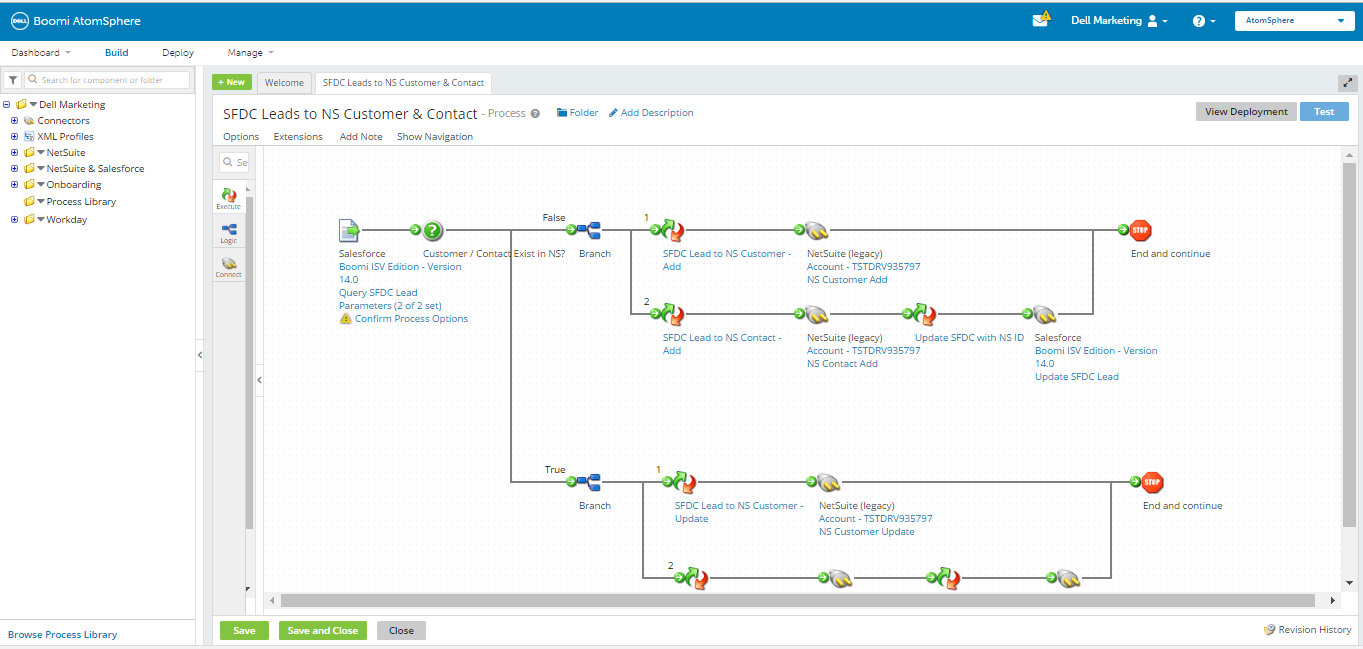
Dell Boomi is used for creating and deploying integrations between different systems and applications, such as enterprise systems like Salesforce, SAP, Oracle and cloud-based platforms like AWS and Azure, without the need of coding and using visual drag-and-drop interface and pre-built connectors, helping businesses to connect and streamline their processes.
It does all this with the following features:
ETL (Extract, Transform, Load) – Of course! Boomi has the functionality to extract data from one application, transform it into the desired format, and then load it into another application or database. This is the foundation of all IPaaS applications, and Boomi does this very efficiently, I might add.
Master Data Hub – Boomi has the functionality to act as the master data hub for your entire business. All of your business data can be analyzed in one application, allowing you to break down departmental barriers and siloed information.
B2B/EDI Management – Boomi has the functionality to replace your current EDI solution by supporting the full range of trading partner communications and even the ability to define custom standards.
API Management – Going hand-in-hand with an ETL tool is the ability to quickly create and deploy custom APIs, allowing you to connect with partners, customers, and other third parties with ease.
Flow – Develop custom workflows that automate processes with functionality built right into the Boomi solution.
Meet an Integration ExpertGet Integration Quote
Dell Boomi Editions
As is the case with most IPaaS solutions, the Dell Boomi solution is broken up into tiers and sold at scale. There are 5 separate editions of Dell Boomi that you can buy. These solutions scale from the smallest SMB’s to the largest enterprise imaginable.
Base Edition
The base edition comes with everything a small business would need to set up a simple integration between two end-points, whether that be a partner, application, or customer.
Base Edition Includes:
- All of the Standard Features (Boomi Suggest, Boomi Assure, Boomi Resolve, Basic Workflow, Connect to on-premise/cloud apps, Visual Designer, Network Access, Unlimited Users, Free Upgrades, Comprehensive Data Transformation)
- 2 Standard Connections
- Standard Support (Documentation, live chat, 15 cases per year, 2 day response time)
Professional Edition
The Professional Edition is a great choice for businesses that are looking to connect more than two applications.
Professional Edition Includes:
- All Standard Features
- Multiple Environments (Makes testing much easier)
- Advanced Workflow (Includes Process Call and versioning functionality)
- Up to 5 Standard Connections
- Standard Support
Pro Plus Edition
Pro Plus Edition is aimed at users who have a lot of end-points they would like to connect and also has a need for “real-time” integrations.
Pro Plus Edition Includes:
- All Standard Features
- Multiple Environments
- Advanced WorkFlow
- Services Enablement (Enables real-time, no latency movement of data between applications)
- 1 Atom Worker (Ensures predictable performance)
- Up to 7 Standard Connections
- Standard Support
Enterprise Edition
The Enterprise Edition is aimed at large enterprises that have many applications to connect, vast amounts of data to move, and more security requirements.
The Enterprise Edition Includes:
- All Standard Features
- Multiple Environments
- Advanced Workflow
- Services Enablement
- 2 Atom Workers
- Parallel Processing (Speeds up data transfers and allows processing to be done offline)
- Advanced Security (Controls user access to keep in compliance with SOX and SSAE16 regulations)
- Up to 10 Standard Connections
- 1 Enterprise Connection
- Standard Support
Enterprise Plus Edition
Enterprise Plus is for the largest of enterprises with a large number of automation needs, security, and additional functionality.
Enterprise Plus Edition Includes:
- All Standard features
- Multiple Environments
- Advanced Workflows
- Services Enablement
- 2 Atom Workers
- Parallel Processing
- Advanced Security
- Message Queuing (Asynchronous process execution whereby a process may invoke other processes in a completely separate invocation)
- Up to 15 Standard Connections
- Up to 2 Enterprise Connections
Dell Boomi Market Adoption and Reviews
Ever since Boomi has been on the market, it has been a top contender for the IPaaS market. Gartner and G2Crowd consistently place Boomi near the top of the pile year after year.
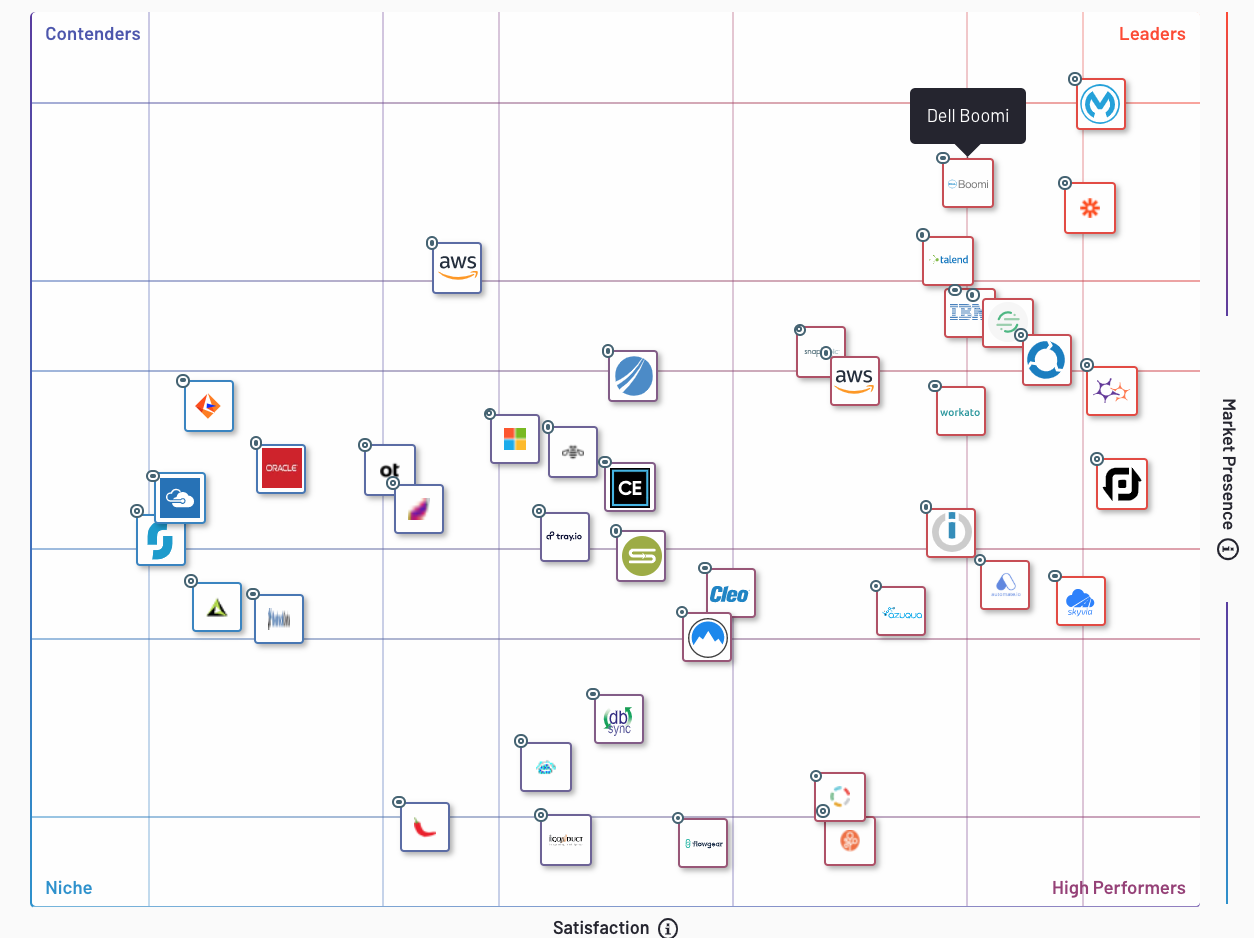
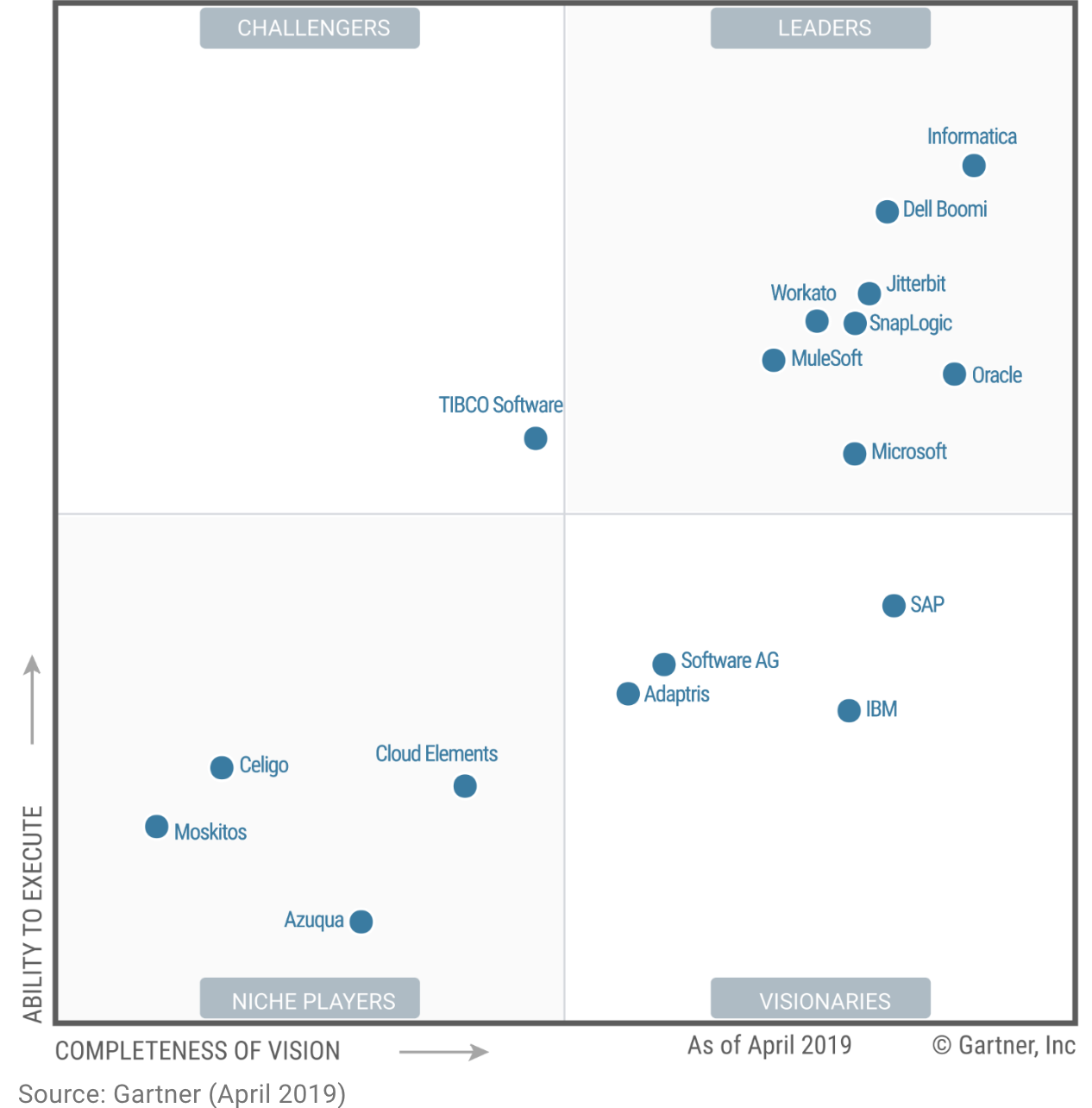
If you’re unfamiliar with “magic quadrant” grading, the closer you are to the top right of the square the more dominant a leader you are in the industry. Now, these quadrants cannot speak to every businesses individual needs but they are a great way to find out what the market values and where you may want to start your search.
Both G2Crowd and Gartner are highly respected institutions for rating enterprise software, and consistently performing well on their quadrants speaks volumes for the Boomi solution.
Meet an Integration ExpertGet Integration Quote
Boomi Reviews
Pros
- Boomi is consistently touted as an “easy to use” and “intuitive” platform
- Users can create integrations much faster than hand-coding and with improved security
- Little coding is required to develop complex integrations
- A lot of pre-built connectors to improve efficiency
- A “powerful” and “flexible” tool capable of pretty much any data-related project
Cons
- All that functionality requires patience to understand and put to its correct use
- For developers, the visual tools and drag and drop interface may feel like a hindrance to traditional development and debugging.
Dell Boomi Pricing
Boomi’s pricing strategy is pretty straightforward. And similar to Acumatica pricing, it scales with the functionality you require and the number of applications/partners/customers you need to connect. Scaling with the end-points is important to note. Some IPaaS solutions will scale with the number of connections or flows between the end-points or even with the amount of data going through the end-points. By scaling with just end-points, you can more easily predict the edition that will best suit your needs today.
Boomi’s pricing compared to the other IPaaS solutions, is quite expensive. G2Crowd reports that its price is on average 40% more than other IPaaS solutions. This is forgivable as the value Dell Boomi brings to the table is considerable.
Conclusion
Finally, I do hope these are the main points you gained from this article;
- Boomi is an IPaaS platform capable of connecting applications, databases, partners and customers.
- Boomi comes is sold in five separate tiers; starting with 2 end-points all the way up to 15.
- Boomis price scales with the number of end-points you want to connect.
- Boomi is a leader in the IPaaS category according to multiple trusted sources
- Boomi is consistently well-reviewed on trusted review forums
- Boomi is one of the pricier option available to users but is also packed with value.
If you have any questions or comments about the Dell Boomi IPaaS platform, that you feel with benefit potential users, please leave them in the comment section below! Also, if you have an integration project related to NetSuite, reach out to our team at eMerge for more help!
If you’d like to see an in-depth demo of the Dell Boomi platform, check out this video.

Related Posts

What is Celigo? The Complete Guide for 2023
Contact us! What is Celigo? Celigo is a company on a mission to ‘enable independent best-of-breed applications to work together as one.’ Pretty straight-forward, but I’ll reiterate just the same. Celigo is a company dedicated…

- Dec 21

Celigo Pricing Demystified: Licensing Options in 2023
Celigo Pricing Explained When it comes to choosing the right integration solution for your business, the cost is often a major consideration. Celigo is a leading provider of integration solutions, offering a range of products…
- Dec 21